Part 3 of 4 · Late morning
Alert response, Automation and AI¶
Observability is the feedback loop. Automation closes it.
Parts 1 and 2 dropped you into observability — the first half of the feedback loop a network engineer reaches for when something looks wrong, built from metrics and logs streaming off the live system. Part 3 is the other half: automation as the action that closes the loop. A real BgpSessionNotUp alert lands. An orchestrator picks it up, asks the source of truth what should be true, holds it against the observability stream, and acts on the gap. SoT · observability · orchestrator — the trio every network automation framework names — wired here with Infrahub, Prometheus + Loki, and Prefect.
Late morning. The clock is creeping toward lunch. The flap-rate panel you built before the break is still pinned in a tab. You're both finishing coffee when a BgpSessionNotUp alert lands — a real one, on the lab. Your senior glances at the dashboard, then at you.
"Watch what happens automatically. The flow's going to handle this without us. Then I'll walk you through the four cases it covers, and you can drive each one yourself. By the end of the hour you'll know exactly what the automation can and can't do for you — and which calls still belong to a human."
Setup check¶
First time spinning up the lab?
If you landed straight on Part 3 without running Quickstart, seed Infrahub once before continuing — the workflow reads from it on every alert:
Reset to known-good baseline first — this expires any silences a prior try-it run might have created and clears any maintenance flags from earlier exercises:
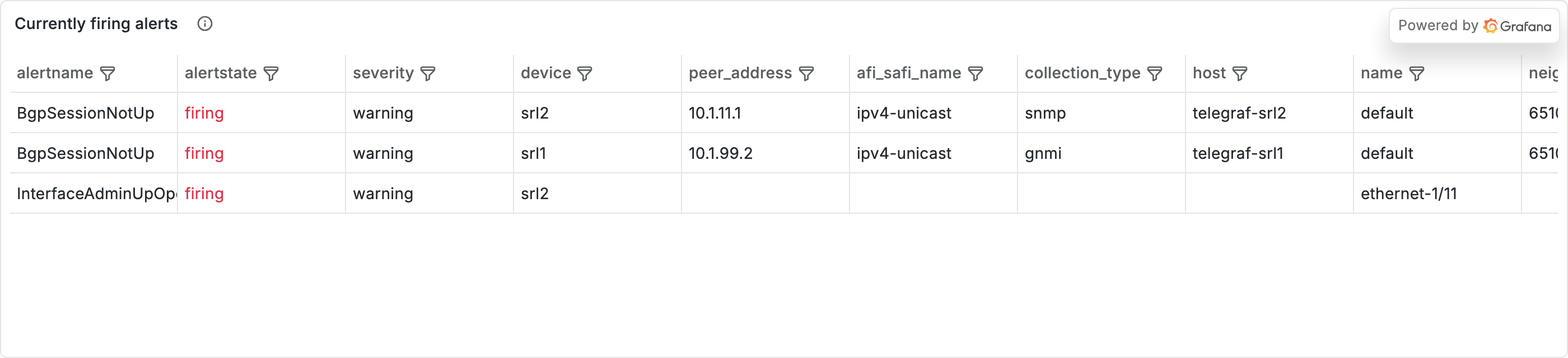
You should see four alerts firing — same shape you saw in Part 2:
| Alertname                | Severity | Device / target  |   State |  Age |
| BgpSessionNotUp          | warning  | srl1 → 10.1.99.2 |  firing |  ... |
| BgpSessionNotUp          | warning  | srl2 → 10.1.11.1 |  firing |  ... |
| InterfaceAdminUpOperDown | warning  | srl1             |  firing |  ... |
| InterfaceAdminUpOperDown | warning  | srl2             |  firing |  ... |
If you skipped Part 2's Walk the alert lifecycle, skim it now — the nobs autocon5 alerts CLI command, the Alertmanager UI, the ALERTS metric, and what firing ↔ suppressed means are all explained there. Part 3 picks up where that leaves off.
The two BgpSessionNotUp rows are what this part is about. Once you walk Step 3, you'll see each cycle firing → suppressed (the workflow silences it for 20 minutes) → firing again (the silence expires). InterfaceAdminUpOperDown is steady-state noise that never moves; ignore it.
If you see fewer than two BgpSessionNotUp rows, give the stack 60 seconds and try again — the rule has a for: 30s clause, so you might have caught it before promotion. A PeerInterfaceFlapping row from Part 2's flap cascade ages out within ~5 minutes.
Enable AI RCA (demo provider)¶
Alongside every workflow decision, the lab can write a short markdown narrative explaining what was seen — useful for the rest of this part because you'll see one in Loki at every step. Enable it now with the demo provider so no API key or budget is required:
Edit workshops/autocon5/.env and set:
Then reload the workflow container so the new env takes effect (a plain docker compose restart won't pick up .env changes):
The demo provider stitches a templated narrative from the same evidence the policy reads — deterministic, free, and offline. Phase 6 covers the concept in detail and walks the optional upgrade to a real LLM provider; for now just know that every workflow run on a proceed decision will write one of these records to Loki with the ai_rca="true" label.
What's a workflow?
A workflow here is code that runs in response to an event. The event is an Alertmanager webhook delivery; the code is a Prefect flow — a sequence of named tasks that collect evidence, evaluate a policy, and either silence the alert or escalate it.
The handoff at a glance:
   alert fires
        │
        ▼
   Alertmanager  ── routes by label match
        │
        ▼
   webhook receiver  ── HTTP POST to Prefect
        │
        ▼
   quarantine_bgp_flow  ── the decision logic
quarantine_bgp_flow is deterministic (same alert payload in, same decision out, every time — also called "rule-based"). Replayable, reviewable in code review (the decision tree is DecisionPolicy.evaluate in workshops/autocon5/automation/workshop_sdk.py), and auditable through audit records it writes to Loki — one log line per decision, with labels you can query later. The full decision tree is broken out in the "Deep dive" fold under The cycle below.
Tip: you'll bounce between query languages from Part 1 throughout this part — PromQL for metrics (
bgp_oper_state{device="srl1", ...}) and LogQL for logs and audit records ({source="prefect", ...}). Both query the same Grafana Explore tab; you switch by changing the datasource picker at the top. (If you skipped Part 1, the Tour's Prometheus section gives you the basics for both — same query language family.)
Open Workshop Home at http://localhost:3000/d/workshop-home. The Currently firing alerts table at the bottom should show those same four rows. Keep this dashboard open in a tab — you'll watch it react to your CLI commands throughout this part.
The cycle — alert → evidence → policy → action¶
Two BgpSessionNotUp alerts are firing in your lab right now (you just saw them in the setup check above). In a traditional setup, each alert would sit in a queue waiting for a human to notice and react. In this lab, there's an automated workflow — a small Python program that watches for new alerts — and it runs the same four steps every time one lands:
- Alert — the workflow notices a new alert. You already saw this part in the setup check.
- Evidence — the workflow gathers facts about the peer the alert is about, from three different sources.
- Policy — the workflow runs a decision rule on those facts: is this something to act on, or is it expected?
- Action — depending on the decision, the workflow silences the alert, writes a record of why, and marks it on the dashboard.
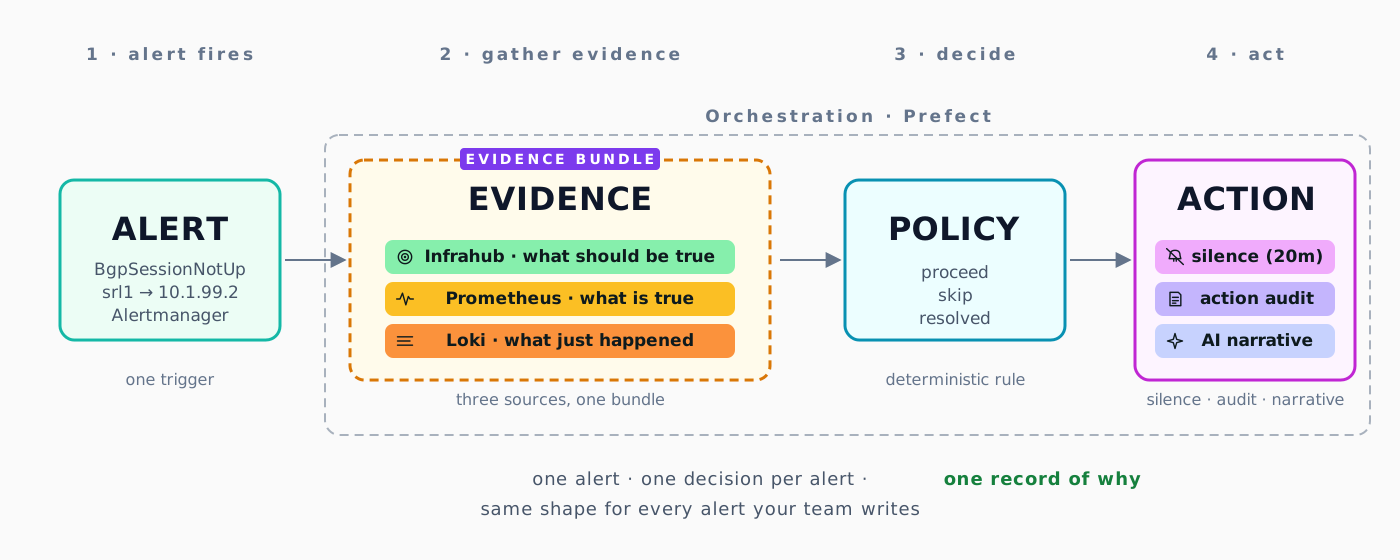
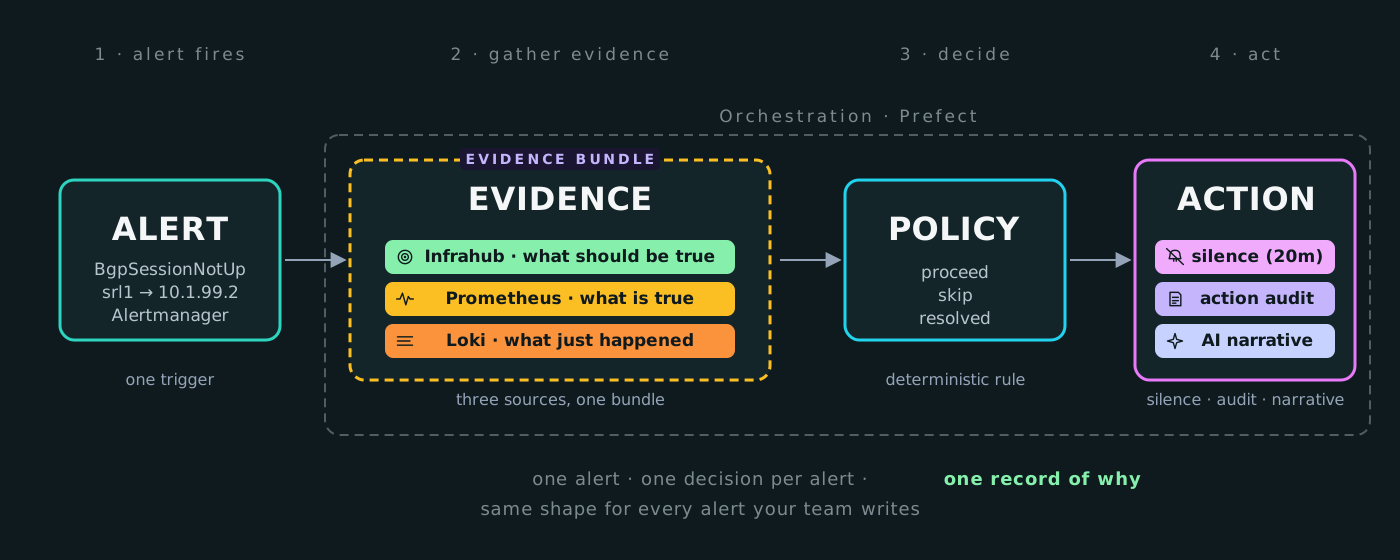
The rest of Part 3 is structured around this cycle:
- Phases 1 → 4 walk one full pass through it — alert (you'll see the firing alert), evidence (you'll run a CLI to see what the workflow gathered), policy (you'll read the decision in Loki), action (you'll look at the silence in Alertmanager and the record it wrote).
- Phases 5 → 7 are variations on the same cycle — flip a flag in the source of truth and watch the same alert land at a different decision (Phase 5), turn on the AI narrative step (Phase 6), then write your own query against the audit trail (Phase 7).
The bigger point — and the reason this matters even outside this lab — is that alerts on their own aren't useful. The loop that wraps each alert (gather context, decide, act, leave a record) is what turns a notification into an operational decision. Once you know the four steps, every alert your team writes follows the same pattern.
Deep dive — the four decision paths in full
Reading material — skim once, then jump to the exercises below. The nested folds are deeper dives you can come back to when something feels unclear during the exercises.
Every BgpSessionNotUp payload that lands on the webhook gets fed through the same decision tree: a deterministic Python function that pulls intent (from Infrahub) and reality (from Prometheus metrics) for the affected peer, compares them, and returns one of a fixed set of outcomes. "Deterministic" here means the same inputs always produce the same decision — no probabilistic step, no LLM judgment in the path. You can replay any historical alert and get bit-identical reasoning, which is what makes the flow reviewable in code review and replayable in a post-mortem. The AI RCA step you'll turn on in Phase 6 sits alongside this decision, not inside it.
   alert payload
        │
        ▼
   collect_evidence  ── SoT (Infrahub) + metrics (Prom) + logs (Loki)
        │
        ▼
   evaluate_policy  ── deterministic decision tree
        │
        ▼
   one of: proceed · skip · resolved · stop
The policy writes one of three decisions for any given alert — proceed, skip, or resolved. The reason there are four paths below is that skip happens for two different reasons (healthy peer / device in maintenance), and we list each reason separately because they're operationally different. There's also a rare bail-out value (stop) for one edge case — explained at the end of this fold.
Every decision the flow makes lands in Loki as an audit record — one log line per evaluation, written by the annotate_decision task right after evaluate_policy returns. The record carries the device, the peer, and a decision label. That label is what lets you slice the audit trail by decision outcome — "how many proceed decisions in the last hour?" — directly in Loki. Phase 7 is the unguided exercise where you answer that question yourself.
| Path | Trigger | Decision | Outcome |
|---|---|---|---|
| Mismatch → proceed | Intent says peer up, metrics disagree | proceed |
The flow signals "this needs human attention" — visible in the audit record, plus a silence |
| Healthy → skip | Intent and metrics agree (no real problem) | skip |
Audit record only |
| In-maintenance → skip | Device's maintenance flag is true in Infrahub |
skip |
Audit record only |
| Resolved → audit trail | Alert resolved | resolved |
Audit record only |
Why four paths instead of collapsing the two skip cases into one? Because the reason not to act matters for the audit trail — "we skipped because the peer is healthy" and "we skipped because the device is in maintenance" should be searchable separately when an operator reads the trail later. Collapsing them would lose that signal.
Bail-out: the policy can also emit stop (the rare edge case) when the device on the alert isn't in Infrahub at all — the SoT lookup returns nothing, the flow can't decide proceed vs skip without intent data, so it bails early with decision=stop and a device not found in Infrahub reason. You'll typically only see it if an alert fires before nobs autocon5 load-infrahub has finished seeding the schema — rare, but real. try-it doesn't exercise this path.
Audit records land in Loki under {source="prefect", workflow="autocon5_quarantine_bgp"} with a decision label that takes one of: proceed, skip, resolved, stop. They're visible in Recent events feeds on both Workshop Home and Device Health.
What does intent actually look like in Infrahub?
The flow asks Infrahub two questions per alert payload — is this peer expected to be up? (expected_state) and is the device in a maintenance window? (maintenance). Both come from the same WorkshopDevice GraphQL query with its bgp_sessions relationship expanded.
(If GraphQL is new to you: it's a query language where you describe exactly the data you want — including fields on related objects — and the server returns nested JSON in the same shape as your request. No more, no less. The WorkshopDevice { … bgp_sessions { … } } block below reads as "give me every WorkshopDevice, and for each one also include its bgp_sessions with these per-session fields." The WorkshopDevice { … bgp_sessions { … } } nesting mirrors that structure directly. The Infrahub Sandbox exposes the schema, so you can autocomplete the field names as you type rather than memorising them.)
Two paths to run it yourself — both valid, both worth knowing:
- Via the Infrahub UI at http://localhost:8000. Login
admin/infrahub. Click Network Device in the left nav, then click srl1 in the list. Themaintenanceboolean,site_name,roleshow in the detail panel; the BGP sessions are on the Bgp Sessions tab. Click any peer (e.g.,10.1.99.2) to see itsexpected_stateandreason(the intended state of this session — what should be happening, not why the current state occurred; e.g."primary uplink, always up"). (Infrahub's UI label for the schema is "Network Device" — the underlying GraphQL type is stillWorkshopDevice, which is what the query below uses.) - Via the GraphQL Sandbox at http://localhost:8000/graphql. Paste the query below and hit run. This is the same query the Prefect flow makes from
automation/workshop_sdk.py— Phase 5's "See the exact query the flow runs" fold covers the verbatim version.
{
  WorkshopDevice(name__value: "srl1") {
    edges {
      node {
        name { value }
        maintenance { value }
        site_name { value }
        role { value }
        bgp_sessions {
          edges {
            node {
              peer_address { value }
              expected_state { value }
              remote_as { value }
              reason { value }
            }
          }
        }
      }
    }
  }
}
What you get back (trimmed to the broken peer's bgp_session for readability):
{
  "data": {
    "WorkshopDevice": {
      "edges": [{
        "node": {
          "name": { "value": "srl1" },
          "maintenance": { "value": false },
          "site_name": { "value": "lab" },
          "role": { "value": "edge" },
          "bgp_sessions": {
            "edges": [{
              "node": {
                "peer_address": { "value": "10.1.99.2" },
                "expected_state": { "value": "established" },
                "remote_as": { "value": 65102 },
                "reason": { "value": null }
              }
            }]
          }
        }
      }]
    }
  }
}
Map that back to the policy logic: maintenance: false means the policy proceeds to the metrics check (no short-circuit); expected_state: "established" for 10.1.99.2 means the SoT believes this peer should be up — so if metrics disagree, the policy returns proceed. That's Path 1 (mismatch → proceed) sitting in the data.
For the deeper "what is Infrahub, why a source of truth" framing, see the Tour's Infrahub section.
What does reality actually look like in the metrics?
The flow asks Prometheus for the current per-peer BGP state — bgp_admin_state, bgp_oper_state, plus the prefix counters. These are the same metric names you queried in Part 1.
Three ways to query the live metrics, in order of friction (lowest to highest):
- Via
nobs autocon5 evidence [OPTIONS] DEVICE PEER— the workshop's pre-built convenience command that consolidates SoT + metrics + recent logs into one CLI output. TheBGP metrics snapshotpanel is exactly what the flow'scollect_evidencetask pulls. Phase 2's evidence walkthrough drives it directly. - Via Grafana Explore at http://localhost:3000. Pick the Prometheus datasource and run each query separately (one per query row):
- Via the Prometheus HTTP API directly, for scripting:
What you'll see on the broken peer:
bgp_admin_state       = 1   (enable)
bgp_oper_state        = 5   (active — retrying)
bgp_received_routes   = 0
bgp_prefixes_accepted = 0
Translated: admin_state: 1 (enable) means the device intends this session up; oper_state: 5 (active, not 1=established) means it isn't actually up; the prefix counters at zero confirm no routes are flowing. Combined with the SoT's expected_state: established, that's a clear intent-vs-reality mismatch — exactly what triggers the proceed path.
Why deterministic, and not an LLM in the loop?
The policy lives in DecisionPolicy.evaluate in workshops/autocon5/automation/workshop_sdk.py — a two-stage if / elif chain. Four reasons that's the right shape for this kind of automation:
- Predictable. Same evidence in, same decision out. No model temperature, no roll of the dice at 02:14.
- Replayable. Six months from now, you can rerun the same alert payload through the same policy version and get identical reasoning — post-mortems have something concrete to anchor to.
- Version-controlled. The policy is code. Changes go through a PR like everything else; a reviewer can read what changed before it ships to production.
- Explainable under pressure. When the on-call asks "why did the flow silence this?", the answer is a function call you can step through, not a model output to argue about.
What's a maintenance window — and how does it differ from a silence?
A maintenance window is intent expressed in the source of truth: WorkshopDevice.maintenance = true on a device in Infrahub. It says "we know this device is being worked on; alerts about it are expected and should be skipped." The policy reads this flag in stage 1 of the decision tree, before it ever looks at metrics, and short-circuits to skip if it's set.
A silence is a per-alert mute applied in Alertmanager after a decision is already made. When the policy decides proceed on a real mismatch, the flow's quarantine task asks Alertmanager to silence the matching alert for 20 minutes so the same page doesn't fire repeatedly while the situation is being investigated.
One is upstream of the decision (maintenance shapes which decision the policy returns); the other is downstream of it (a silence is one of the actions a proceed decision triggers). Conflating the two is the most common point of confusion in this part — Phase 5 walks the maintenance path explicitly to drive the distinction home.
Walk the cycle¶
In a hurry, or want to re-walk this later without re-reading the explanations? There's a cheat-code at the end of this guide — six CLI commands that drive the whole arc in about five minutes.
1. Alert — see it fire¶
The workflow can't do anything until an alert exists. Start here: confirm the lab has alerts to work with.
You should see four rows. Two of them are BgpSessionNotUp — those are the alerts we'll follow through the rest of this part:
| Alertname                | Severity | Device / target  |   State |  Age |
| BgpSessionNotUp          | warning  | srl1 → 10.1.99.2 |  firing |  ... |
| BgpSessionNotUp          | warning  | srl2 → 10.1.11.1 |  firing |  ... |
| InterfaceAdminUpOperDown | warning  | srl1             |  firing |  ... |
| InterfaceAdminUpOperDown | warning  | srl2             |  firing |  ... |
Three things to notice:
- The
devicelabel — the router the alert is about (srl1,srl2). The workflow uses this to look up the device in Infrahub. - The
targetlabel — the peer IP the session is with. In the alert it's calledtarget; the workflow maps it topeer_addresswhen querying Infrahub and Prometheus. - The State column. All four should read
firing. If a row showssuppressedinstead, the workflow already muted it temporarily —suppressedmeans "the alert is still active but a silence is muting the page". Either state is fine for this part; Phase 4 walks the details.
Prefer the browser? Open Alertmanager at http://localhost:9093/#/alerts. Same four rows, with click-to-expand details. (If you skipped Part 2's "From panel to alert" section, the alert lifecycle — pending → firing → suppressed → resolved — is walked in detail there.)
The same alert + suppressed state + silencing ID also shows in the Alert panel of nobs autocon5 cycle srl1 10.1.99.2 — useful if you'll be re-observing this step later.
The path from "alert in Alertmanager" to "workflow running" looks like this:
   Prometheus / Loki rule evaluator
              │
              ▼  ALERT fires once
   ┌──────────────────────────────────────────┐ ◄── nobs autocon5 alerts
   │              Alertmanager                │     (reads /api/v2/alerts)
   │  Holds active alerts in its own memory.  │
   │  Sends ONE webhook on first fire (~5s),  │
   │  then again only every repeat_interval   │
   │  (30 min in this lab).                   │
   └──────────────────┬───────────────────────┘
                      │ HTTP POST (webhook)
   ┌── Orchestration (Prefect) ────────────────┐
   │                  ▼                         │
   │      alert_receiver flow                  │
   │              │ dispatches by alertname    │
   │              ▼                            │
   │      quarantine_bgp_flow                  │
   │              │                            │
   │              ▼                            │
   │      Evidence (§2) ─► Policy (§3) ─► Action (§4)
   │                                            │
   └────────────────────────────────────────────┘
Heads-up for the rest of Part 3 — Alertmanager's repeat_interval
Once Alertmanager has fired the webhook for an alert, it won't fire again for the same alert for 30 minutes (the repeat_interval line in the diagram). That's normal — it stops pager spam for humans. But it does mean that if you want to re-observe a step in the next phases, you can't just wait it out, and nobs autocon5 reset won't help either (it clears state but doesn't reset Alertmanager's per-alert timer).
Instead, use:
It posts the alert payload straight to Prefect, bypassing Alertmanager's timer. Fresh cycle, predictable timing, no waiting. With no --trigger flag it just renders the current state (alerts, silences, recent flow runs, latest decision) — useful any time you want to capture "where is the workflow right now?" in one command.
For Part 3, we focus on what happens after the alert is firing: the workflow picks it up and decides what to do. That starts with gathering facts.
2. Evidence — what the workflow collected¶
Under the hood, gathering evidence looks like this:
   ┌── Orchestration (Prefect) ──────────────────────────────────┐
   │                                                              │
   │   collect_evidence task                                     │
   │       │                                                      │
   │       ├──► Infrahub    · GraphQL: WorkshopDevice (intent)   │
   │       ├──► Prometheus  · PromQL:  bgp_*_state, routes       │ ◄── nobs autocon5 evidence
   │       └──► Loki        · LogQL:   BGP-filtered log lines    │     (same three sources,
   │       │                                                      │      run ad-hoc, no flow)
   │       ▼  EvidenceBundle                                     │
   │                                                              │
   │   evaluate_policy task ──► §3 Policy                        │
   │                                                              │
   └──────────────────────────────────────────────────────────────┘
Before the workflow decides anything, it gathers facts about the peer the alert is firing on. We call this the evidence: three pieces of information about the peer, plus a preview of what the workflow's decision rule would say given those facts.
You can see exactly what the workflow sees with one command:
(10.1.99.2 is the broken peer on srl1 — same one in the firing list from Phase 1.)
The output is four panels. Each answers a different question:
| Panel | Source | Answers |
|---|---|---|
| Source of truth (Infrahub) | The intent database | "Is this peer supposed to be up?" |
| BGP metrics snapshot (Prometheus) | The metrics store | "Is this peer actually up?" |
| Loki — last 20 relevant log lines | The log store | "What happened recently on this peer?" |
| Policy hint | The workflow's decision rule | "What would the workflow decide right now?" |
What the four panels actually look like in the terminal
Running nobs autocon5 evidence srl1 10.1.99.2 against the broken peer produces four panels. Here's what each one actually looks like in the terminal, with the connecting thread between them called out.
╭───────────────────── Source of truth (Infrahub) ─────────────────────╮
│ device          srl1   site=lab  role=edge                           │
│ maintenance     false                                                │
│ intended peer   yes                                                  │
│ expected state  established                                          │
│ reason          ip-mismatch-demo                                     │
│ remote_as       65102                                                │
╰──────────────────────────────────────────────────────────────────────╯
        ↑ Same fields the Prefect flow's `collect_evidence` task reads via GraphQL.
          `maintenance=false` → stage 1 of the policy proceeds to the metrics check.
          `expected_state=established` → SoT says this peer should be up.

   BGP metrics snapshot (Prometheus)
┏━━━━━━━━━━━━━━━━━━━┳━━━━━━━┳━━━━━━━━━┓
┃ Metric            ┃ Value ┃ Decoded ┃
┡━━━━━━━━━━━━━━━━━━━╇━━━━━━━╇━━━━━━━━━┩
│ admin_state       │     1 │ enable  │
│ oper_state        │     5 │ active  │
│ received_routes   │     0 │ —       │
│ sent_routes       │    10 │ —       │
│ active_routes     │    10 │ —       │
│ suppressed_routes │     0 │ —       │
└───────────────────┴───────┴─────────┘
        ↑ The `Decoded` column is the number-to-name mapping (each numeric
          state code translated to its plain-English name) — `oper_state=5`
          decodes to `active` (retrying, not yet established). admin=1, oper=5
          on a peer the SoT expects `established` is the intent-vs-reality mismatch.

╭─────────────── Loki — last 20 relevant line(s) ──────────────────────╮
│ {"timestamp":"...","severity":"warn","message":"BGP neighbor         │
│  10.1.99.2: connection refused — peer not reachable on configured    │
│  subnet",...}                                                        │
│ {"timestamp":"...","severity":"warn","message":"BGP neighbor         │
│  10.1.99.2: configured remote-as 65102 but peer never responded;     │
│  FSM stuck in active",...}                                           │
│ {"timestamp":"...","severity":"info","message":"QUARANTINE applied   │
│  (silence_id=...)",...}                                              │
╰──────────────────────────────────────────────────────────────────────╯
        ↑ Mixed log streams: device-emitted BGP errors (the "why") and prior
          audit records the workflow wrote on earlier runs (the "what the flow did
          before — e.g., QUARANTINE = the action Phase 4 covers"). One bundle,
          multiple sources. ("FSM" in the sample is BGP's finite state machine — the
          progression Idle → Active → Connect → OpenSent → Established;
          "stuck in active" means the peer is retrying but never reaching
          Established.)

╭──────────────── Policy hint ────────────────╮
│ decision: proceed                           │
│ reason  : SoT expects peer up, but metrics  │
│           show mismatch                     │
╰─────────────────────────────────────────────╯
        ↑ The deterministic policy's verdict on this exact bundle. The Prefect
          flow's `evaluate_policy` task computes the same answer and writes it
          to Loki as the `decision=proceed` audit record you'll see in Phase 3.
All four panels together are the full picture for one peer: what the SoT believes, what the metrics measure, what the recent logs say, and what the policy concludes. The Policy hint is the same answer the Prefect flow reaches in production — nobs autocon5 evidence just surfaces it on the CLI first, so you can predict the decision before an alert ever fires.
Curious how the workflow collects all this in Python? Three small calls
Each of the three "fact" panels comes from one tiny method in workshops/autocon5/automation/workshop_sdk.py. Snippets below — not the full module, just enough to feel the shape.
Metrics — six instant PromQL reads:
def bgp_metrics_snapshot(self, device, peer_address, afi_safi, instance_name) -> dict[str, float]:
    qs = self.bgp_queries(device, peer_address, afi_safi, instance_name)
    return {
        "admin_state":     first_prom_value(self.prom.instant(qs["admin_state"]),     default=-1),
        "oper_state":      first_prom_value(self.prom.instant(qs["oper_state"]),      default=-1),
        "received_routes": first_prom_value(self.prom.instant(qs["received_routes"]), default=0),
        # ... three more, same shape
    }
self.prom.instant(...) is a one-line HTTP GET to Prometheus's /api/v1/query; first_prom_value unwraps the JSON to a single float. Point-in-time reads, nothing clever.
Logs — one LogQL query scoped to the peer:
def bgp_logql(self, device, peer_address) -> str:
    return (
        f'{{device="{device}"}} '
        f'!= "license" '
        f'|~ "(bgp|BGP|neighbor|session|route|ipv4-unicast|{peer_address})"'
    )

def bgp_logs(self, device, peer_address, minutes=10, limit=200) -> list[str]:
    return self.loki.query_range(
        self.bgp_logql(device, peer_address), minutes=minutes, limit=limit
    )
Stream selector pins the device; the regex line filter (|~) keeps anything BGP-shaped or mentioning the peer's IP. One query returns both device-emitted BGP errors and the workflow's earlier audit records — the mixed-stream payload you saw in panel three above.
Intent — one GraphQL call to Infrahub:
def bgp_gate(self, device, peer_address, afi_safi) -> dict:
    return self.sot.build_bgp_intent_gate(
        device=device, peer_address=peer_address, afi_safi=afi_safi,
    )
self.sot wraps an Infrahub HTTP client; build_bgp_intent_gate issues one typed GraphQL query and packs the result into a plain dict — {"found": ..., "maintenance": ..., "expected_state": ..., "reason": ..., ...}. No magic; just GraphQL with a schema on the other side.
The decode step — the Decoded column in panel two (oper_state=5 → active) comes from a tiny lookup table:
OPER_MAP = {0: "unknown", 1: "established", 2: "idle", 3: "connect", 4: "openconfirm", 5: "active"}

def decode_bgp_states(metrics: dict[str, float]) -> dict[str, str]:
    oper = int(metrics["oper_state"])
    return {"oper_state": OPER_MAP.get(oper, str(oper))}
Numeric protocol enums are great on the wire and useless on a dashboard — this is the entire translation layer.
All four wired together — the only thing the Prefect task calls:
def collect_bgp_evidence(self, device, peer_address, afi_safi, instance_name, ...):
    ev = EvidenceBundle(device=device, peer_address=peer_address, ...)
    ev.sot     = self.bgp_gate(device, peer_address, afi_safi)
    ev.metrics = self.bgp_metrics_snapshot(device, peer_address, afi_safi, instance_name)
    ev.sot["decoded"] = decode_bgp_states(ev.metrics)
    ev.logs    = self.bgp_logs(device, peer_address)
    return ev
Three reads, one decode, return a dataclass. The whole "evidence-gathering" step is roughly ten lines of orchestration; the rest of workshop_sdk.py is thin HTTP clients (self.prom, self.loki, self.sot, self.am) that talk to each store.
The first two panels are the key pair:
- Source of truth says what should be true — for this peer,
expected_state=establishedmeans "should be up and exchanging routes." - Metrics say what is true — for this peer,
oper_state=5means the BGP session is stuck trying to come up.
The gap between those two is the reason the alert is firing.
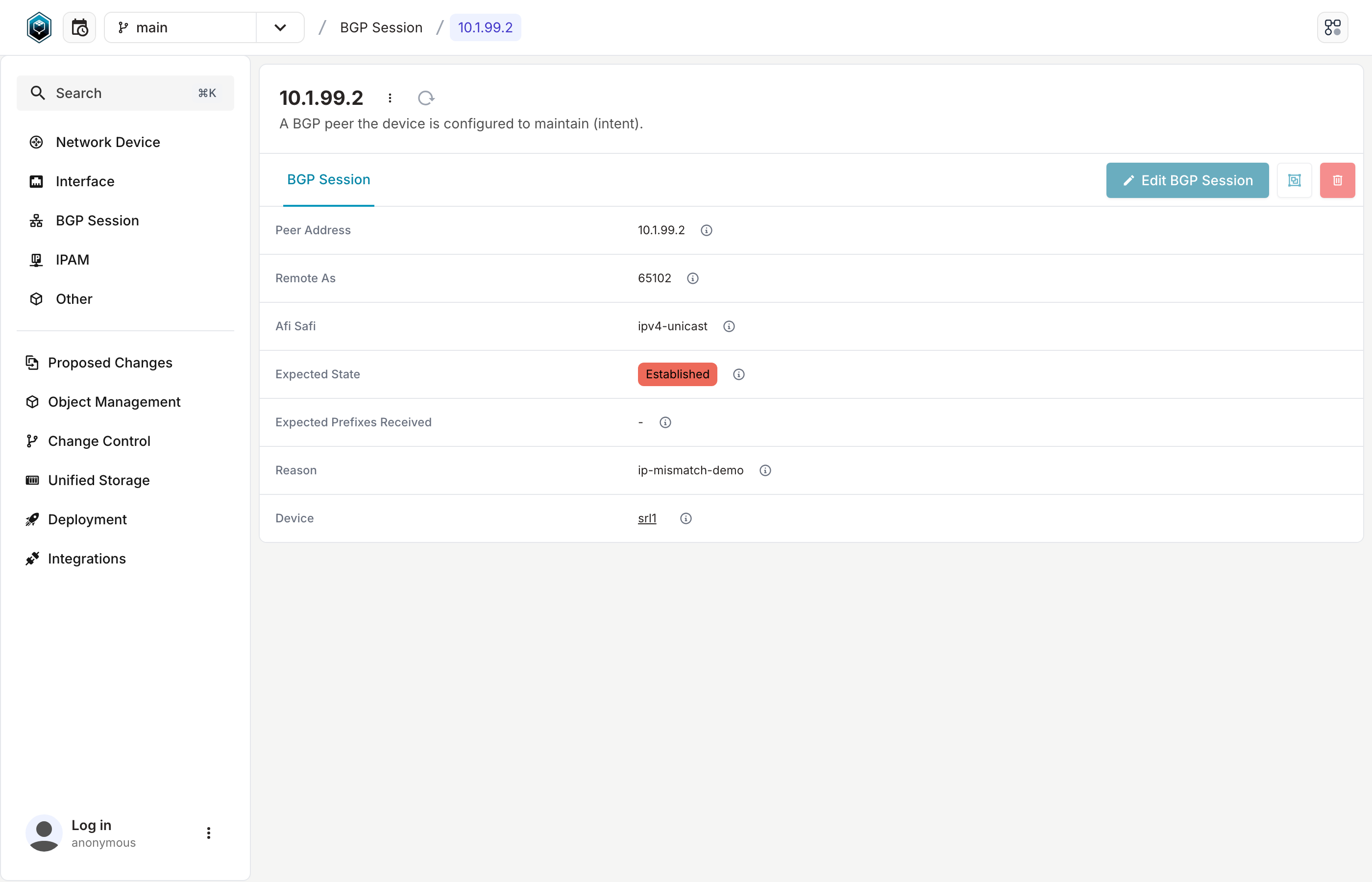
You can see the same source-of-truth data in the Infrahub browser UI. Open http://localhost:8000 — the landing page shows you as anonymous at the bottom-left. Click "Log in" in that bottom-left area, enter admin / infrahub in the form that opens, and submit. Then click Network Device in the left nav, click srl1, then click the Bgp Sessions tab. The row for 10.1.99.2 shows Expected State: Established, Reason: ip-mismatch-demo. Same data the workflow reads, just rendered for humans.
Why pull all this for one alert? Because the alert on its own doesn't say enough.
BgpSessionNotUponly tells us "a BGP session is down" — but the right action depends on whether the session was supposed to be up, whether the device is in maintenance, and whether the session has already come back. Those answers live in three different systems. The workflow pulls all three in one go.
3. Policy — what was decided and why¶
Under the hood, the policy stage looks like this:
   ┌── Orchestration (Prefect) ──────────────────────────────┐
   │                                                          │
   │   evaluate_policy task                                  │
   │       │ DecisionPolicy.evaluate(EvidenceBundle)         │
   │       ▼                                                  │
   │     Decision { proceed | skip | resolved }              │
   │       │                                                  │
   │       ├──► annotate_decision (writes Loki audit record) │ ◄── nobs autocon5 rca
   │       │                                                  │     (renders the latest
   │       ▼                                                  │      audit record as MD)
   │     §4 Action                                            │
   │                                                          │
   └──────────────────────────────────────────────────────────┘
Phase 2 showed you the facts the workflow gathered. Phase 3 looks at the decision the workflow made from those facts — and where to find a written record of it.
When the workflow finishes looking at a peer, it writes one line to the log store (Loki) describing what it decided. We call this an audit record — same shape as a normal log line, with extra labels saying which workflow ran, which peer it was for, and what it decided. The record survives long after the alert is gone, so you can ask Loki "what did the workflow do an hour ago?" or "what did it decide on srl1 last week?" and get an answer.
Open Grafana, switch to the Loki datasource in Explore, and paste:
{source="prefect", workflow="autocon5_quarantine_bgp", device="srl1", decision=~"proceed|skip|resolved"} | json
The decision=~"proceed|skip|resolved" matcher keeps the result tight: only the workflow's decision audit records. The same Loki stream also carries AI narrative records (ai_rca="true") and action confirmations (QUARANTINE applied …); the explicit decision filter hides those for now so the focus is just on the policy outcome. Phase 4 §D · The AI narrative shows what the stream looks like without the filter.
The | json at the end is LogQL's way of saying "parse each log line's body as JSON so I can read individual fields" — the workflow writes its records as JSON, so this turns each line into a structured object Grafana renders inline (one field per row, right under the log line — no clicking needed).
No records yet?
If the query returns "No data", the workflow hasn't processed an alert on this peer yet. The workflow only runs when an alert fires at it — give the lab ~30–60 seconds after the setup-check reset for the always-firing alerts to make their way through, then re-run the query. (Or skip ahead to Phase 4 and come back; by then there'll be records.)
You should see one log line per decision the workflow has made on srl1 recently. Look at the most recent one — Grafana parses the JSON inline, so every field is visible right under the row. The same record is the Most-recent-decision panel in nobs autocon5 cycle srl1 10.1.99.2 if you'd rather read it from the terminal.
The fields that matter on the decision record:
| Field | Value (for the broken peer) | What it means |
|---|---|---|
decision (label) |
proceed |
The workflow decided to take action |
peer_address (label) |
10.1.99.2 |
Which peer this decision was about |
message (field) |
SoT expects peer up, but metrics show mismatch |
Plain-English reason |
timestamp |
2026-… |
When the workflow ran |
That message is the same answer the Policy hint panel showed you in Phase 2 — just now it's permanent. Anyone who comes back to this alert tomorrow can run the same query and read what the workflow decided and why.
What does an audit record actually look like in Loki?
The flow's annotate_decision task writes one Loki log line per policy evaluation — the "audit records" referenced above. Two examples side by side: decision=proceed (the actionable mismatch you're looking at now) and decision=stop (the rare bail-out when the device isn't in Infrahub at all):
// decision=proceed (the actionable mismatch path)
{
  "timestamp": "2026-05-26T11:15:26.971Z",
  "severity": "info",
  "message": "SoT expects peer up, but metrics show mismatch",
  "labels": {
    "decision": "proceed",
    "device": "srl2",
    "peer_address": "10.1.11.1",
    "source": "prefect",
    "workflow": "autocon5_quarantine_bgp"
  },
  "fields": {}
}

// decision=stop (would only appear if Infrahub didn't have the device)
{
  "timestamp": "2026-05-26T10:43:31.234Z",
  "severity": "info",
  "message": "device not found in Infrahub",
  "labels": {
    "decision": "stop",
    "device": "srl2",
    "peer_address": "10.1.11.1",
    "source": "prefect",
    "workflow": "autocon5_quarantine_bgp"
  },
  "fields": {}
}
Every record carries the same five-label envelope (source, workflow, decision, device, peer_address) plus a free-form message. That label set is what makes Phase 7's aggregation query (sum by (decision) (count_over_time(...))) work — collapsing on the label that distinguishes paths is the whole game. The message field carries human-readable reasoning ("SoT expects peer up, but metrics show mismatch" vs "device not found in Infrahub") — Loki indexes the labels, not the message, so queries filter on the former and read the latter.
The three decisions, explained¶
The workflow can write one of three decisions for any given alert:
| Decision | When it fires | What happens next |
|---|---|---|
proceed |
The source of truth says this peer should be up, but the metrics say it isn't. | Something is actually wrong. The workflow takes action (Phase 4). |
skip |
Either the device is in a maintenance window, or the peer is healthy according to the metrics. | No action needed. The workflow just records that it checked. |
resolved |
The alert has stopped firing on its own (the underlying problem went away). | No action needed. The workflow records that it resolved. |
Three different decisions, all written to the same audit trail, all queryable with the same LogQL line you just ran. Phase 5 walks the maintenance → skip path — flipping a single flag in the source of truth so the same broken peer ends up at skip instead of proceed. For now, what matters is that the workflow's decision is visible and explained — not buried in code, not guessed from behaviour.
Why write the decision instead of just doing the action? Because in a real on-call rotation, the next person who looks at this peer needs to know what was decided and why — not just what happened. A silenced alert tells you "someone or something muted this" but doesn't tell you the reasoning. An audit record carries the reasoning forward, queryable, forever.
4. Action — what proceed actually does¶
Under the hood, the action stage forks into two parallel sub-stages once the policy decides — a deterministic action (only fires on proceed) and an AI narrative (always fires, content varies by decision):
   ┌── Orchestration (Prefect) ──────────────────────────────────────────┐
   │                                                                      │
   │   Decision (from §3)                                                │
   │       │                                                              │
   │       │   ┌── Deterministic action (only on `proceed`) ────────────┐│
   │       ├──►│  quarantine_task                                        ││
   │       │   │      ├──► Alertmanager  · silence (20m)                ││
   │       │   │      └──► Loki          · QUARANTINE applied audit     ││
   │       │   └──────────────────────────────────────────────────────────┘│
   │       │                                                              │
   │       │   ┌── AI narrative (always runs; content varies) ───────────┐│ ◄── nobs autocon5 cycle
   │       └──►│  ai_rca_task / ai_rca_skipped_task                      ││     (renders the cycle's
   │           │      ├─ proceed   → Loki + LLM call (RCA narrative)    ││      four panels in one
   │           │      ├─ skip      → Loki ("not run — policy=skip")     ││      command)
   │           │      └─ disabled  → Loki ("AI RCA disabled")           ││
   │           └──────────────────────────────────────────────────────────┘│
   │                                                                      │
   └──────────────────────────────────────────────────────────────────────┘
(resolved decisions go through a separate resolved_bgp_flow — same shape, different path; it's covered in the Optional deep dives fold below.)
Phase 3 showed you the workflow decided proceed on the broken peer. The word proceed only means something if you know what it triggers. Here's what actually happens in the lab when the workflow returns proceed — three concrete things, each in a different system (the first two are the deterministic action, the third is the AI narrative).
A · The silence — containment in Alertmanager¶
The workflow asks Alertmanager to silence the alert for 20 minutes. Same kind of silence you created by hand in Part 2's "Create a silence by hand" section — only this one was created automatically, scoped to the specific peer.
To see all silences scoped to this peer (plus the current alert state and recent flow runs) in one shot:
That'll show you a row for the workflow's freshly-created 20-minute silence, with its Starts / Ends / Remaining columns.
Why a silence sometimes reads shorter than 20 minutes in the UI
The silence is created with a 20-minute endsAt, but a few things can shorten the visible duration:
nobs autocon5 resettruncates every workshop-related silence to NOW as part of clearing state. After a reset, an Alertmanager UI lookup will show the silence as already-expired (or near it).- Re-running the workflow on the same alert (via
cycle --triggeror a real Alertmanager re-push) creates a new 20-minute silence. The old one continues to expire on its original timeline; both are visible if you list silences with--show-expired.
If the silence you're looking at reads ~3 minutes instead of 20, you most likely just ran reset — the workflow wrote a 20-minute silence and reset immediately truncated its endsAt.
Run nobs autocon5 alerts — the BgpSessionNotUp row for srl1 → 10.1.99.2 should now show suppressed in the State column. Let's look at that silence in Alertmanager.
Open Alertmanager at http://localhost:9093/#/alerts. In the filter bar at the top, check the Silenced tickbox — silenced alerts are hidden by default. Find the row for BgpSessionNotUp on srl1 → 10.1.99.2. Expand the row — the header will show silenced highlighted. Click the silenced icon to land on the silence detail page. Three things worth noticing:
- Matchers —
alertname=BgpSessionNotUp,device=srl1,peer_address=10.1.99.2. The workflow built these from the alert's own labels — same labels you saw in Phase 1. - Comment —
QUARANTINE: SoT expects peer up, but metrics show mismatch. Same reason as the audit record from Phase 3. - Created by — the workflow itself, not a human.
Don't see suppressed?
If the row shows firing instead, the previous silence has expired. Alertmanager won't re-push the alert to the workflow for up to 30 minutes (the repeat_interval from Phase 1's diagram), so don't wait it out — drive a fresh cycle yourself:
Within ~10 seconds a new 20-minute silence is in place; refresh the Alertmanager page and the row should flip to suppressed.
Why silence and not fix? Silencing stops the page from firing again for 20 minutes — the same alert won't wake the on-call up twice for the same issue. The underlying problem is still happening (the rule keeps matching); the silence just mutes the notification path. Part 2's "What's a silence?" section walks the silence-vs-fixing distinction in detail.
B · The action audit + dashboard mark — Loki record, optionally visualised in Grafana¶
When the workflow finishes acting, it writes a second Loki record specifically about the action it just took:
The labels are source=prefect, workflow=autocon5_quarantine_bgp, device=srl1, peer_address=10.1.99.2 — note the absence of a decision label. Phase 3's record carries decision=proceed; this one carries the silence ID. Two records, two roles: §3's says what was decided, this one says what was done. Query the action audit specifically:
You'll see one row per proceed cycle, each pinpointing when the workflow took action.
Drawing this on a Grafana panel. The same query can drive a Grafana annotation — a vertical line on any panel marking the exact moment the workflow acted. In Grafana, open any dashboard, Edit → Dashboard options → Annotations → New annotation, datasource Loki, query as above. From then on, every panel on that dashboard gets a vertical line at every action-applied timestamp. That's the real "dashboard mark" — when the workflow acted, not (as the Part 2 ALERTS overlay shows) when the alert was firing. Different signals; the action mark is far more useful for post-incident review because it answers "what did the automation do, and when?"
C · The AI narrative — same evidence, different voice¶
Alongside the deterministic action, the workflow also writes a short narrative explaining the situation in plain language — what we call an AI RCA record (RCA = Root Cause Analysis). This step always runs, but the content depends on the decision:
| Decision | What lands in Loki |
|---|---|
proceed |
Multi-section narrative the AI produced (Severity & confidence / Most likely cause / Immediate actions / What to verify next) |
skip |
Brief annotation: "AI RCA not run — policy decided skip (reason)" |
ENABLE_AI_RCA=false |
Brief annotation: "AI RCA disabled" |
These records sit in the same Loki stream as the decision records, but carry an ai_rca="true" label instead of a decision=… label. The Phase 3 query's decision=~"…" filter hides them; drop that filter to see both kinds of record together:
You'll see two recent records for the same alert: one with decision=proceed (the deterministic outcome) and one with ai_rca="true" (the AI narrative). Both are grounded in the same evidence the workflow gathered in Phase 2.
Or render the latest narrative as Markdown directly in the terminal:
The big idea. AI in an on-call loop should be a narrative tool, not a decision tool. The decision is what stays the same across replays and code reviews. The narrative is what reads well at 02:14 am. Keep them separate, keep them both grounded in the same evidence, and you get the best of both worlds.
Worth noting for Phase 7: the AI narrative records share the workflow's Loki stream but don't carry a decision label (since they're not decisions — they're narratives). So if you later count records grouped by decision, the AI records will land in an empty/unlabeled bucket rather than alongside proceed / skip / resolved. Phase 7 walks the query that surfaces this.
By default the lab ships with the demo provider — a deterministic templated narrative stitched from the evidence dict. Phase 6 walks the optional upgrade to a real LLM (OpenAI / Anthropic) with an API key.
What proceed doesn't do¶
Worth saying out loud, so it doesn't trip you up:
- It does not fix the underlying problem on the device. The broken peer stays broken until a human (or a separate remediation flow) addresses it.
- It does not open a ticket or page the on-call directly. In production this is where you'd hook in PagerDuty, OpsGenie, Jira, Slack — in this lab, the silence + action audit + AI narrative is the full chain.
- It does not decide what to do next. That's a human's job: read the action audit, read the narrative, look at the dashboard, walk the runbook.
What proceed does do is contain the noise (silence in Alertmanager), record the action with a queryable timestamp (action audit in Loki, optionally rendered as an annotation on any Grafana panel), and stitch a plain-language summary (AI narrative). Three observable outcomes from one decision — the loop closing for this alert.
5. Maintenance branch — same drill, opposite decision¶
You've now walked the cycle once: alert → evidence → policy → action. The workflow saw a real mismatch and decided proceed.
But here's the thing — the same alert doesn't always need action. If srl1 is in a planned maintenance window, the operator already knows the BGP peer might bounce around. They don't want the workflow paging them. The workflow needs to know about the maintenance.
That information lives in the source of truth (Infrahub). Phase 5 flips a single flag — srl1.maintenance from false to true — and shows you how that one change makes the workflow decide skip on the same alert with the same evidence.
Step 1 · Flip the maintenance flag¶
The --state flag sets srl1.maintenance to true (later we'll use --clear to set it back to false). The CLI confirms:
╭──── WorkshopDevice updated ────╮
│ srl1.maintenance: False → True │
╰────────────────────────────────╯
   The next alert for this device will be SKIPPED by the policy.
Two things happened:
- The CLI wrote
maintenance=trueto srl1's record in Infrahub. - The CLI also wrote one log line to Loki recording the change (the same audit trail Phase 3 walked, just with
source="workshop-trigger"instead ofsource="prefect").
The workflow reads this value fresh on every alert evaluation — so the moment the flag flips, the next decision the workflow makes uses the new value.
Step 2 · See the flag in Infrahub¶
Open Infrahub at http://localhost:8000. If you haven't logged in yet, click Log in in the bottom-left, enter admin / infrahub, and submit. Then click Network Device in the left nav, then click srl1. The maintenance field now reads true.
This is the same field the workflow's evidence panel showed you in Phase 2 — when the workflow gathered evidence, it asked Infrahub "is srl1 in maintenance?" and the answer was false. Now the answer is true.
Step 3 · Re-trigger the workflow¶
The workflow only runs when something pushes an alert at it. Waiting for Alertmanager to re-fire takes up to 30 minutes (the repeat_interval from Phase 1). For this exercise we drive the workflow directly so the re-evaluation lands within seconds:
Same alert payload, same workflow, same decision logic — just bypassing Alertmanager's timer. The command also re-renders the four-panel cycle state once the new flow run lands, so you'll see the fresh decision in the same shot.
What's the wrapper doing under the hood?
cycle --trigger posts an alert payload directly to the Prefect alert_receiver flow's webhook (the same one Alertmanager calls). The raw command is:
docker compose --project-name autocon5 exec prefect-flows \
  prefect deployment run alert-receiver/alert-receiver \
  --param alertname=BgpSessionNotUp \
  --param status=firing \
  --param 'alert_group={"alerts":[{"labels":{"device":"srl1","peer_address":"10.1.99.2","afi_safi_name":"ipv4-unicast"}}],"groupLabels":{"alertname":"BgpSessionNotUp"},"status":"firing"}'
cycle --trigger builds the same payload, posts it, polls Prefect until a fresh flow run appears for this peer, then renders the resulting state. Use the wrapper for the workshop walk; the raw command is the right tool when you're scripting outside the lab.
Step 4 · Read the new decision in Loki¶
Wait ~10 seconds for the workflow to finish. Then re-run the Phase 3 LogQL query in Grafana:
{source="prefect", workflow="autocon5_quarantine_bgp", device="srl1", decision=~"proceed|skip|resolved"} | json
The most recent line now reads:
| Field | Value |
|---|---|
decision (label) |
skip |
message (field) |
device under maintenance |
Same broken peer, same metrics, same evidence as Phase 3 — but a skip decision instead of proceed. The change happened because the intent in the source of truth changed.
There's a second, more subtle side-effect worth seeing — the AI RCA step also skipped. The workflow only runs AI RCA when the policy decided proceed; running an LLM on a decision the policy has already chosen not to act on wastes compute (and real money on a paid provider) and contradicts the lesson — if the SoT says "don't act", we don't act anywhere, including the narrative step. Confirm with:
The most recent line reads AI RCA not run — policy decided skip (device under maintenance). Conserves compute / API cost when the policy has already decided not to act. Same ai_rca="true" label as a real narrative, but an explanatory message instead of a multi-section RCA. That's the SoT → observability → automation triangle closing all the way: one label flip in Infrahub propagates through every step of the workflow's behavior, including the parts that cost money.
Don't clear maintenance until you've seen the skip audit record
Step 5 below clears the maintenance flag. If you race ahead and clear it before the workflow has actually re-evaluated, it'll re-read maintenance=false and return proceed instead of skip. Confirm the skip log line has landed in Loki first, then continue.
Step 5 · Clear the maintenance flag¶
srl1.maintenance is back to false. The next alert will be evaluated normally — back on the proceed path.
The big idea. Maintenance isn't a separate alerting layer. It's not a config you stash in the workflow code. It's a label in the source of truth that the workflow consults at decision time. One label flip, opposite decision, same evidence. That's what makes context-aware alerting actually work in production — the workflow doesn't guess whether to act; it looks up whether to act.
6. (Optional) Swap to a real LLM provider for the narrative¶
Every decision you've seen so far has been deterministic: the workflow looks at the evidence and makes a yes/no call based on a fixed rule. Same inputs, same outputs, every time. That's by design — the workflow has to be replayable, reviewable, auditable.
What you've also been seeing since Setup is the AI RCA step — a short narrative the workflow writes alongside each proceed decision (the records with ai_rca="true" in your Loki queries). RCA stands for Root Cause Analysis. The AI does not decide what to do. The deterministic policy still picks proceed or skip. The AI just writes a paragraph alongside the decision — think of it as the on-call's first-draft writeup, generated automatically and stapled to the audit record.
The demo provider you enabled in Setup writes a templated narrative — deterministic, free, offline, but only as smart as the evidence dict it stitches together. This phase is the optional upgrade: swap to a real LLM (OpenAI or Anthropic) with an API key, and the workflow makes a real model call. Same evidence in, real reasoning out. Skip this phase if you don't have a key — none of Part 3's lessons depend on it.
Going further — three common gotchas when wiring up a real OpenAI or Anthropic key
Worth a 30-second skim before you set a real API key.
ChatGPT Plus is not the same product as the OpenAI API. They share a login but have separate billing — a Plus subscription gives you ChatGPT.com access only; it does not include API credits or higher API rate limits. A fresh API key on an account that's never funded the API will return 429 Too Many Requests on the very first call (the free-tier API quota is $0). Fix: go to https://platform.openai.com/settings/organization/billing/overview, add a payment method, prepay $5 (a single RCA call costs roughly \(0.001–\)0.01 depending on the model), wait ~1–2 minutes for the credit to propagate, then retry.
AI_RCA_MODEL must be a real model identifier. The string gets sent verbatim to the provider's /chat/completions (OpenAI) or /messages (Anthropic) endpoint, so a typo means a server-side error — usually 404 model_not_found, sometimes wrapped as 429 depending on the account state. Use a real OpenAI model like gpt-4o-mini, gpt-5, or gpt-5-mini; for Anthropic, something like claude-haiku-4-5-20251001. If Loki shows AI RCA call failed: HTTPError: 4xx ..., the model string is the first thing to check.
After any .env edit, re-run nobs autocon5 up (or the underlying docker compose --project-name autocon5 up -d --force-recreate prefect-flows). A plain docker compose restart prefect-flows will not pick up the new value — restart reuses the container's existing env, while up -d recreates it against the current .env. If you swap an API key and then see 401 Unauthorized in Loki, the container is almost certainly still holding the old (revoked) key. Quick check that the container actually got the new key — compare tail= against the last four chars of the key in your .env:
docker compose --project-name autocon5 exec prefect-flows \
  python3 -c "import os; k=os.environ.get('OPENAI_API_KEY',''); print(f'len={len(k)} head={k[:7]} tail={k[-4:]}')"
If they don't match, the container is stale — re-run nobs autocon5 up.
Reasoning models (gpt-5, o1, o3) often exceed the workshop's HTTP timeout. They think internally before answering and a single call can take 30–60+ seconds. The lab's HTTP client gives up after 60s and writes AI RCA call failed: ReadTimeout: ... to Loki. Stick with gpt-4o-mini, gpt-5-mini, or claude-haiku-4-5-20251001 for the workshop — they respond in 1–3 seconds, the narrative is short and bounded, and you don't pay reasoning-model rates for output a faster model already nails.
Step 1 · Swap the provider and key in .env¶
Edit workshops/autocon5/.env — ENABLE_AI_RCA=true stays as-is from Setup; you're only swapping the provider and adding a key:
AI_RCA_PROVIDER=openai          # or anthropic
AI_RCA_MODEL=gpt-4o-mini        # or claude-haiku-4-5-20251001
OPENAI_API_KEY=sk-...           # or ANTHROPIC_API_KEY=sk-ant-...
Then reload the workflow container so the new env takes effect (a plain docker compose restart won't — see the gotchas fold above for why):
Step 2 · Trigger a fresh cycle and read the new narrative¶
The first command posts a fresh alert payload (bypassing Alertmanager's repeat_interval) and re-renders the cycle state once the new flow run lands. The second renders the latest AI narrative for that peer as Markdown in the terminal.
Compare the rendered narrative to the demo voice you've been seeing all along. A real LLM (OpenAI or Anthropic) typically adds:
- Domain inference — translates raw metric values into operational hypotheses ("
oper_state=5withreceived_routes=0is consistent with a TCP reachability failure or AS-number mismatch — the FSM is trying but not authenticating") instead of just restating them. - Wider context — references the BGP state machine, common causes for "stuck in active", suggested next debug steps (traceroute, configured remote-as check).
- Calibrated uncertainty — phrases like "most likely" or "consistent with" rather than confident pronouncements.
The deterministic policy decision is unchanged between demo and real provider. The narrative is the only thing that swapped — different voice, identical evidence, identical decision.
Read the narrative in its rendered shape
The query above shows each JSON field on its own row — handy for inspecting structure, but hard on the eyes for prose. To render message with its markdown headers and bullets intact, swap to:
The line_format directive replaces the rendered log line with just the unescaped message value (the | json parser has already turned the \n escapes into real newlines). Turn on Wrap lines in the Grafana Logs view toolbar so the multi-line narrative wraps instead of scrolling sideways.
Prefer the terminal? Same data, rendered as Markdown:
Most-recent narrative for that device/peer pair. Both args are optional (omit to see the latest record across the lab); add --last 3 to compare several recent runs side by side, --minutes 180 to widen the lookback window.
What the demo AI RCA narrative actually contains
With AI_RCA_PROVIDER=demo, the workshop ships a templated narrative that fills three sections (Most likely cause / Immediate actions / What to verify next) from the same evidence the deterministic policy reads. Here's what the demo writes for the broken peer:
AI RCA:
(demo narrative — set AI_RCA_PROVIDER=openai|anthropic with an API key
for a real model response.)

## Most likely cause
SoT expects peer 10.1.99.2 on srl1 to be established, with intent reason 'ip-mismatch-demo',
but oper_state=5 (active), admin_state=1 (enable), received_routes=0.

## Immediate actions
- Inspect reachability and timers between srl1 and 10.1.99.2

## What to verify next
- Tail Loki for device=srl1 around the alert window for BGP state transitions
- Check whether the SoT reason 'ip-mismatch-demo' matches a known fault class
- Compare received_routes=0 against expected_prefixes_received in the SoT
This lands in Loki as one log line with these labels:
ai_rca=true
device=srl1
peer_address=10.1.99.2
source=prefect
workflow=autocon5_quarantine_bgp
severity=info
The narrative is grounded in the same evidence the deterministic policy used — SoT's expected_state, the metric values, the prefix counter. The template doesn't invent facts; it stitches the evidence into prose. When you flip AI_RCA_PROVIDER to openai or anthropic later, the model gets that same evidence dict and writes its own three-section response — different voice, identical inputs. The ai_rca="true" label is what distinguishes these records from the deterministic decision=... records in the same Loki stream.
The split between decision (deterministic) and narrative (AI) is the lesson the workshop is most insistent about — see Phase 4 §D for the big idea framing. With a real LLM provider, the narrative side gets richer; the deterministic decision is unchanged.
Done experimenting? Revert to the offline demo provider
Two-step revert. In workshops/autocon5/.env:
Then reload the container so the new env takes effect (a plain docker compose restart won't pick up .env changes):
The workflow keeps writing AI RCA annotations, but they're templated again — no API calls, no cost. (Leave your API key in .env; it's ignored when the provider is demo.) If you'd rather turn the step off entirely, set ENABLE_AI_RCA=false instead.
7. Your turn — find what the workflow actually did¶
You've walked every step of the cycle. Now use what you've seen.
Without scrolling any dashboard, how many alerts has the workflow handled in the time range you're looking at, broken down by decision?
The data: Every decision the workflow makes lands in Loki under source="prefect". The query you've used a few times now ({source="prefect", workflow="autocon5_quarantine_bgp", device="srl1"} | json) shows you the raw records. You need a query that counts them, grouped by decision.
Two hints if you get stuck:
count_over_time({...}[$__range])turns a Loki query into a number — same pattern as Part 1 exercise 11.$__rangeis a Grafana template variable that resolves to whatever your time picker is set to, so the query adapts to the window you're looking at instead of being hard-coded to a literal like[1h].sum by (label) (...)collapses everything except the label you list. Pick the label that gives the most informative breakdown — tryworkflowfirst (one row, not useful), then trydecision(a few rows, much more useful).
Have a go before scrolling to the solution. One extra hint: drop both the device="srl1" and decision=~"..." filters from the Phase 3 query — this question asks about the workflow's full activity across both devices, and you want the AI narrative records in the result so you can see them land in the empty decision bucket alongside proceed / skip / resolved.
Solution and what your query should return
sum by (decision) (count_over_time({source="prefect", workflow="autocon5_quarantine_bgp"}[$__range]))
With Explore set to a range that covers your walk (say "Last 30 minutes"), you should land on something like:
| Decision | Count |
|---|---|
proceed |
a few |
skip |
a few |
resolved |
maybe a few |
| (empty) | several — AI RCA records don't carry a decision label |
Exact counts depend on how many cycles you drove by hand. If you get a single row total, you've collapsed too aggressively (no by clause). If you get dozens of rows, you've left a high-cardinality label unaggregated.
The big idea. The audit trail isn't just for humans to read line-by-line. It's a queryable data source — every decision the workflow made is one log line, with labels, ready for aggregation. "How many alerts did the workflow proceed on this morning?" is one query away.
Optional deep dives¶
The phases above walk one full cycle with all the concepts spelled out. If you want to go further — see all four paths run at once, look at the workflow in the Prefect UI, or trigger the workflow directly without an alert — pick whichever fold sounds useful. Each one is independent of the others.
Walk all four paths at once with try-it --auto
The phases above had you walk one path by hand (proceed) and then a second path by flipping a flag (skip via maintenance). The workshop also ships a single command that walks all four paths in about 30 seconds with synthetic payloads, so you can see the whole arc at once:
You should see four ✓ rows print:
╭─── Path 1 - Actionable / mismatch → proceed ───╮
   ✓ replayed firing payload for srl1 → 10.1.99.2
   ✓ quarantine flow decided 'proceed' for the actionable mismatch

╭─── Path 2 - In-maintenance → skip ───╮
   ✓ srl1.maintenance = True
   ✓ replayed firing payload for srl1 → 10.1.99.2
   ✓ quarantine flow saw maintenance=true and skipped

╭─── Path 3 - Healthy peer → skip ───╮
   ✓ replayed firing payload for srl1 → 10.1.2.2
   ✓ quarantine flow decided 'skip' for healthy peer

╭─── Path 4 - Resolved → audit ───╮
   ✓ replayed resolved payload for srl1 → 10.1.99.2
   ✓ resolved_bgp_flow ran and annotated 'resolved'
Each path posts an alert payload directly to the webhook and waits for the matching log line to land in Loki. Four ✓ rows means the workflow walked every branch correctly. After it finishes, Phase 7's LogQL query gives you the aggregated counts across all four paths.
Tour the Prefect UI
Everything you've seen in this part has happened through a Prefect workflow. Prefect's UI lets you look at the workflow from a different angle — task graph, per-task logs, run history. The Loki audit trail is the record; the Prefect UI is the workshop.
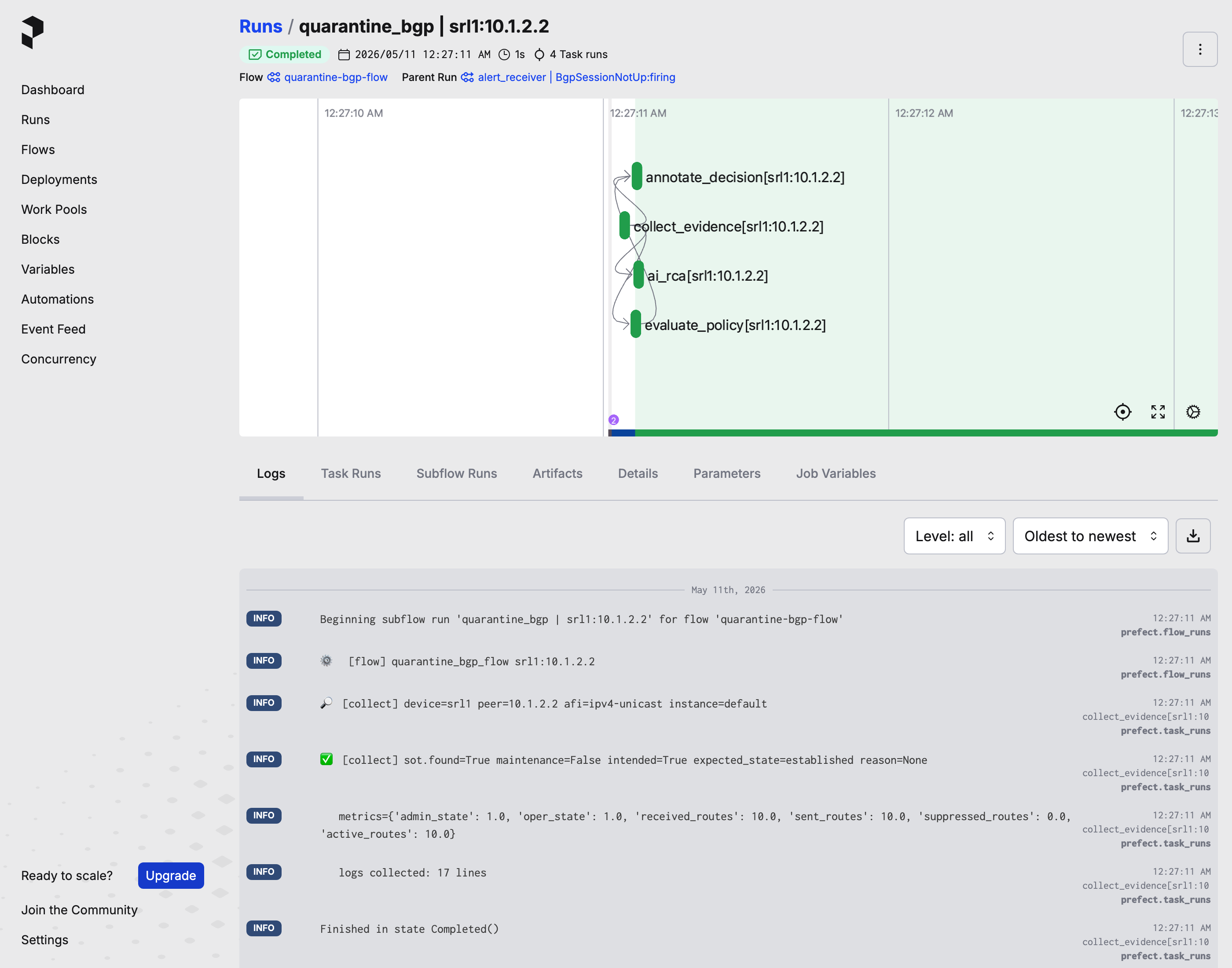
Open Prefect at http://localhost:4200/runs. If a "Join the Prefect Community" pop-up appears, click Skip to dismiss it — it's a sign-up prompt, unrelated to the lab. Sort by Start Time (newest first) and click the most recent quarantine_bgp | … flow run.
You'll see:
- Task graph — the steps the workflow ran, in order:
collect_evidence→evaluate_policy→annotate_decision→ai_rca→ (ifproceed)quarantine→annotate_action. Same shape as the Phase 1–4 walk. - Per-task logs — every line the workflow printed, indexed by task. Same content as
nobs autocon5 logs prefect-flows, but searchable per task. - Tags — labels on each task like
device:srl1,peer_address:10.1.99.2,action:quarantine. These are what an operator filters on to find "every run that touched this peer."
The Tour's Prefect section walks the full UI tour with screenshots — useful when you want a more guided look without the workshop context wrapping it.
Trigger the workflow directly without an alert
The webhook is one way to drive the workflow. You can also drive it manually from the CLI — useful when you want to skip the alert lifecycle entirely (no Alertmanager repeat_interval wait), test a payload shape, or iterate on the policy.
The workshop wrapper is:
Under the hood, the wrapper posts an AlertmanagerAlert-shaped payload to the Prefect alert_receiver flow's webhook, polls Prefect until a fresh flow run appears for this peer, then renders the resulting state. The raw prefect deployment run equivalent (useful when scripting outside the lab) is:
docker compose --project-name autocon5 exec prefect-flows \
  prefect deployment run alert-receiver/alert-receiver \
  --param alertname=BgpSessionNotUp \
  --param status=firing \
  --param 'alert_group={"alerts":[{"labels":{"device":"srl1","peer_address":"10.1.99.2","afi_safi_name":"ipv4-unicast"}}],"groupLabels":{"alertname":"BgpSessionNotUp"},"status":"firing"}'
Same workflow, same decision logic, no alert. To exercise the resolved-bgp branch instead of quarantine, use cycle --status resolved.
Flap without the BGP cascade
nobs autocon5 flap-interface --device srl1 --interface ethernet-1/1 causes a full cascade — the interface flap drags the BGP session down with it, which fires BgpSessionNotUp and runs the workflow. If you only want to exercise the PeerInterfaceFlapping alert (the Loki-rule one from Part 2) without touching BGP, pass --no-cascade:
BGP stays up, BgpSessionNotUp stays clean, and the workflow never fires. Useful when you want to exercise the Loki alert path in isolation.
What the workflow actually looks like in Python
The quarantine_bgp_flow you've been walking is a Python function. The whole thing is short enough to read end-to-end:
@flow(log_prints=True, flow_run_name="quarantine_bgp | {device}:{peer_address}")
def quarantine_bgp_flow(device, peer_address, ...):
    ev = collect_bgp_evidence_task(device=device, peer_address=peer_address, ...)
    decision = evaluate_policy_task(device=device, peer_address=peer_address, ev=ev)
    annotate_decision_task(workflow="autocon5_quarantine_bgp", ..., decision=decision)
    rca_text = ai_rca_task(workflow="autocon5_quarantine_bgp", ..., ev=ev)
    if decision.decision != "proceed":
        return {...}
    silence_id = quarantine_task(device=device, peer_address=peer_address, minutes=20)
    annotate_action_task(...)
    return {...}
Six function calls, matching the steps you walked across Phases 2–4. The @flow decorator on top is what gives this a UI, retries, per-task logs, and a queryable record. "Automation" here is a Python function with decorators on top.
Full source: workshops/autocon5/automation/flows.py.
Chain another workflow when this one completes
Prefect can also fire a second workflow whenever this one completes — useful for hooking in notifications, opening tickets, or kicking off a follow-up runbook. The pattern is called a Prefect Automation ("when X happens, do Y"). The Tour's Automations subsection walks the setup with screenshots and an example.
Reflection¶
Your senior leans back. "Last one's a thinking exercise. Pick any of the paths you just ran and answer this for yourself."
Which path would I trust the AI's narrative on without a second look? Which would I always double-check by hand? Why?
Some hints to guide the discussion:
- The mismatch-proceed path acts on real production state. If the AI narrative is wrong, what's the blast radius?
- The healthy-skip path is a no-op. Does the AI narrative add anything for an on-call?
- The maintenance-skip path depends on the source of truth being right. What if Infrahub's wrong?
- The resolved path is post-hoc. Is "what just happened" a stronger or weaker case for AI than "what should I do now"?
There's no single right answer. The point is that the same tool isn't equally valuable for all four paths, and you should know which is which before you trust the narrative in the heat of an incident.
Stretch goals (optional — pick one if you have time)¶
-
Tail the Prefect flow logs in real time. Watch a flow run from the inside, line-by-line, so you can correlate every decision in the audit-record trail with the task that produced it.
Solution — how to tail, plus what you'll see in the log stream
Run
nobs autocon5 logs prefect-flowsin one terminal, then re-runnobs autocon5 try-it --autoin another.Each
try-it --autocycle produces a burst of log lines, one per task as the flow runs through it. For aproceedpath:[collect] device=srl1 peer=10.1.99.2 afi=ipv4-unicast instance=default [collect] sot.found=True maintenance=False intended=True expected_state=established reason='ip-mismatch-demo' metrics={'admin_state': 1.0, 'oper_state': 5.0, 'received_routes': 0.0, ...} logs collected: 50 lines [policy] srl1:10.1.99.2 stage1 SoT-only → ok (intended, not in maintenance) stage2 SoT + metrics → proceed (mismatch) [annotate] decision=proceed reason=SoT expects peer up, but metrics show mismatch [ai_rca] running (gated by ENABLE_AI_RCA) [ai_rca] annotated: AI RCA disabled ... # or, with AI RCA on, the first line of the narrative [quarantine] silencing srl1:10.1.99.2 for 20m [flow] action=quarantine silence_id=...The
[collect]lines show the exact SoT + metric values the policy will see. The[policy]lines show which stage matched and why. The[annotate]line carries the samedecisionandreasonyou find in Loki under{source="prefect"}. Tailing the logs is the fastest debug loop when the flow returns an unexpected decision — every intermediate value is visible without a single LogQL query. -
Compare evidence between a healthy peer and a broken one. Both peers share the same SoT intent, but the policy fires
proceedon one andskipon the other. Find the field that drives the difference.Solution — commands to run and what differs between the two
Run both:
nobs autocon5 evidence srl1 10.1.2.2   # a healthy peer
nobs autocon5 evidence srl1 10.1.99.2  # a broken one
Both peers share the same intent in the SoT (
expected_state: established) — the SoT can't tell which one is broken on its own. What separates them is reality, in the metrics:Row Healthy 10.1.2.2Broken 10.1.99.2SoT expected_stateestablishedestablished← sameSoT reasonempty ip-mismatch-demoMetric admin_state1 (enable)1 (enable)← sameMetric oper_state1 (established)5 (active)Metric received_routes100Policy hint skip — peer matches SoT intentproceed — SoT vs metrics mismatchThe policy fires
proceedwhenexpected_state=establishedANDoper_state ≠ 1. Both peers have the same SoT intent — the gap between intent and reality is what the policy keys on. -
Toggle maintenance on srl2 instead of srl1. The maintenance-skip path isn't hard-coded to a specific device. Confirm it by flipping maintenance on srl2 instead and verifying the skip swapped devices.
Solution — commands + verify in Loki that the skip swapped device
nobs autocon5 try-it --autoonly walks srl1 paths, so it won't exercise srl2. Usecycle --triggerpointed at srl2's broken peer instead:The
cyclecommand renders the fresh state once the flow run lands — you should seedecision=skipin the Most-recent-decision panel with the reason"device under maintenance". To confirm in Loki directly:Same record. The
messageis"device under maintenance"— same reason the policy gave for srl1 earlier, only the subject changed.The point of the exercise: the policy is device-agnostic. It consults the SoT for whichever device the alert payload names. Flipping maintenance on any device routes that device's alerts to skip, automatically. The decision logic isn't hard-coded to a particular device.
Don't forget
nobs autocon5 maintenance --device srl2 --clearafterwards (or runnobs autocon5 reset— it clears both devices). -
Watch a path's audit records in Loki directly. Every Prefect decision lands as a structured JSON record in Loki. Tail them live to see the audit trail being written as you trigger paths.
Solution — LogQL query + the audit-trail shape
In Grafana Explore on the Loki datasource, paste:
Each record has this shape (Grafana parses the JSON inline, so every field renders right under the row):
{
  "timestamp": "...",
  "severity": "info",
  "message": "SoT expects peer up, but metrics show mismatch",
  "labels": {
    "decision": "proceed",
    "device": "srl1",
    "peer_address": "10.1.99.2",
    "source": "prefect",
    "workflow": "autocon5_quarantine_bgp"
  }
}
Add
| decision="proceed"(ordecision="skip"/decision="resolved") to filter to one path. Triggering a flap or runningnobs autocon5 try-it --autoin another tab produces fresh annotations in real time — flip the time picker's Live mode on to watch them stream in.Step 5's unguided LogQL query (
sum by (decision) (count_over_time({source="prefect"}[1h]))) rolls these annotations up bydecisionlabel — the same audit-trail data, just aggregated. -
Swap the AI RCA provider. Compare the templated demo provider's RCA narrative against a real LLM's. What does the LLM add that the template can't?
Solution — how to switch providers + guidance on the comparison
If you have an OpenAI or Anthropic key, set
AI_RCA_PROVIDER=openai(oranthropic) inworkshops/autocon5/.envalong with the matchingAI_RCA_MODELandOPENAI_API_KEY/ANTHROPIC_API_KEY. Then runnobs autocon5 upto recreate the flow container against the new env (a plaindocker compose restartwon't pick the values up — see the Going further — three common gotchas fold under Step 1 above for the full why).Trigger a quarantine path so the workflow runs end-to-end with AI RCA on:
Path 1 (firing → quarantine on
srl1:10.1.99.2) lands ondecision=proceed, which is the only decision that invokes AI RCA — so the new narrative lands in Loki underai_rca="true". (Paths that resolve toskipwrite a brief annotation instead, explaining why the LLM was not run — sameai_rca="true"label.) Read it straight from the terminal — same data the Loki query in Step 3 returned, rendered as Markdown in a Rich panel:Add
--last 3to compare the most recent runs side by side — useful right after a provider swap to see the same evidence rendered by two different models.The demo provider produces a templated narrative — it stitches evidence-bundle fields into the same paragraph structure every time:
## Most likely cause
SoT expects peer 10.1.99.2 on srl1 to be established, with intent reason
'ip-mismatch-demo', but oper_state=5 (active), admin_state=1 (enable),
received_routes=0.
A real LLM (OpenAI or Anthropic) typically adds:
- Domain inference — translates the raw numbers into operational hypotheses ("
oper_state=5withreceived_routes=0is consistent with a TCP-level reachability failure or AS-number mismatch — the FSM is trying but not authenticating"). - Wider context — references the BGP state machine, common causes for "stuck in active", suggested next debug steps (traceroute, configured remote-as check).
- Calibrated uncertainty — phrases like "most likely" or "consistent with" rather than confident pronouncements.
The template can't do any of this — it can only fill slots. But the template is deterministic and free; the LLM is inference-richer but non-deterministic and costs per call. The trade-off is the lesson: the policy decides what to act on; the narrative — template or LLM — explains why for a human reader. Pick the right narrative tool for the audience and the budget.
- Domain inference — translates the raw numbers into operational hypotheses ("
What you took away¶
Your senior signs off as the lunch break lands. "You're ready to take primary tomorrow. If something fires, walk the same arc — triage, diagnose, contain, fix, document. The advanced guide is yours when you've eaten; if you take it, you'll know what 02:14 am page looks like by the time you get to it."
- Alerts are an explicit operational decision, not a notification. The deterministic flow turns each alert payload into a categorised action by enriching with source-of-truth.
- The same alert payload routes to four different decisions depending on context (
proceed,skipfor healthy,skipfor maintenance,resolved). Without enrichment, every alert looks the same. - The evidence bundle is the contract between the deterministic policy and the AI RCA — both consume it, neither sees more than the other.
- Maintenance windows aren't a separate alerting layer. They're a label the flow consults at decision time. One source of truth, one decision point.
- AI RCA is opt-in narrative around the same evidence. It's a paragraph stapled next to the decision, not the decision itself. Human judgment still owns the "act / don't act" call.
- The four paths are the recipe: mismatch → proceed, healthy → skip, maintenance → skip, resolved → audit. Memorise them — they generalise to any alert your team writes.
Cheat-code — the whole Part 3 cycle from the CLI in 6 commands
For a live demo, a quick re-walk, or just confirming you can still drive the cycle after coming back to it later, you can run the whole arc from the terminal in about five minutes. Each command's output maps onto the system layer the corresponding phase above walks through in detail.
nobs autocon5 cycle srl1 10.1.99.2                      # Phase 1: observe baseline (alert + silences + flows + decision)
nobs autocon5 evidence srl1 10.1.99.2                   # Phase 2: see what the workflow sees (SoT + metrics + logs)
nobs autocon5 cycle srl1 10.1.99.2 --trigger            # Phases 3 + 4: drive the proceed path; fresh silence appears
nobs autocon5 maintenance --device srl1 --state         # Phase 5 setup: flip the SoT flag
nobs autocon5 cycle srl1 10.1.99.2 --trigger            # Phase 5: same alert → opposite decision (skip; no new silence)
nobs autocon5 maintenance --device srl1 --clear         # cleanup
The punchline lives in the Flow runs panel of the last cycle output: two adjacent rows for the same alert, one decision=proceed (from the third command), one decision=skip (from the fifth). The Silences panel grows by one row only on the proceed run — the absence of a silence on the skip run is the visible proof that the policy decided not to act. A third side-effect lives in Loki: querying {source="prefect", ai_rca="true"} | json shows the proceed run produced a multi-section narrative, while the skip run wrote "AI RCA not run — policy decided skip…". Same alert, same evidence, opposite decisions, the entire workflow behavior (silence + LLM call + audit trail) flipped by one field in the source of truth.
The phases above explain why each panel reads the way it does, and walk the same story through Alertmanager, Loki, and Prefect's own UIs.