Workshop overview · Pre-flight
Welcome — here's the day
A four-hour, laptop-friendly workshop. You bring Docker; we bring the rest.
By lunchtime you'll have queried real-shaped telemetry, made a dashboard answer an operational question, watched alerts route through an automated workflow, and seen what an opt-in AI RCA step does next to that workflow.
FAQ
Do I need network engineering experience?
Helpful, not required. Every concept (BGP peering, interface state, syslog UPDOWN events) is framed before you query it.
Do I need to know Prometheus, Loki, or Grafana already?
A sketch-level idea of "metrics database" and "log database" is enough. Part 1 builds PromQL and LogQL from scratch against live data.
What if I've never used Docker?
You need Docker installed and running, but you don't need to write a Dockerfile. If docker ps works on your laptop, you're set. New to Docker? The Install Docker and uv page has per-platform install pointers.
Why do I need uv installed?
We use uv to install and run the workshop's nobs CLI — a thin wrapper that fronts every workshop command (up, down, status, alerts, flap-interface, and the rest). With uv set up the rest of the day flows through one-line commands instead of raw docker compose commands. The same Install page has the install one-liner.
What if my laptop is on Windows?
We recommend macOS or a Linux-based system — on Windows the workshop should run natively under WSL 2, but we haven't tested it there. Native Windows / PowerShell isn't supported.
How big is the stack?
Around 21 containers, ~5.5 GB of RAM, and ~5 GB of disk. The first nobs autocon5 up pulls 3–5 GB of images — that's the slow step. After that, restarts are fast.
Can I run this offline?
Yes, once images are pulled. The only outbound call during the workshop is the optional AI RCA step (needs a provider key and internet). If conference Wi-Fi melts, the lab keeps running.
Is anything sent to a remote service?
No, by default. All telemetry, alerts, and dashboards are local. The AI RCA step is opt-in (ENABLE_AI_RCA=false by default) and only calls OpenAI or Anthropic if you set a key in .env.
Why simulated devices instead of real network OS containers?
Real SR Linux or vEOS containers need 4–6 GB of RAM each, which would price most laptops out of a multi-device lab. Sonda emits the same raw shapes a real device would — gNMI for srl1 (SR Linux-style), SNMP for srl2 (Cisco/Arista/Juniper-style) — plus the matching syslog events, so the queries you write here are the same ones you'd run against production. If you want the full lab with real containers, the companion repo is network-observability-lab.
Can I keep using this after the workshop?
Yes — fork the repo and the stack is yours. nobs autocon5 destroy cleanly tears it down when you're finished.
Before you arrive
Follow the Quickstart for the one-time setup — install Docker and uv, clone the repo, uv sync --all-packages, activate .venv/, then nobs autocon5 up and nobs autocon5 load-infrahub. Budget ~8 GB of free RAM and ~5 GB of disk while the stack is running. Run nobs preflight from anywhere in the repo to confirm Docker, Compose v2, RAM, disk, and outbound reachability are all green — do this the night before so any [FAIL] lines have time to fix.
Once the stack is up and Infrahub is seeded, you'll have:
| Service | URL | Notes |
|---|---|---|
| Grafana | http://localhost:3000 | login admin / admin (or whatever you set in .env) |
| Prometheus | http://localhost:9090 | targets, rules, query browser |
| Alertmanager | http://localhost:9093 | active alerts + silences |
| Loki | http://localhost:3001 | LogQL endpoint (queried from Grafana) |
| Infrahub | http://localhost:8000 | source-of-truth UI + GraphQL playground |
| Prefect | http://localhost:4200 | workflow runs in Part 3 |
| Sonda HTTP API | http://localhost:8085 | the synthetic telemetry control plane |
When you're done:
nobs autocon5 down       # stop everything but keep volumes
nobs autocon5 destroy    # full reset (drops volumes too)
If anything misbehaves during the workshop, ask the instructor — they have the operator runbook in docs/troubleshooting.md.
What's actually running
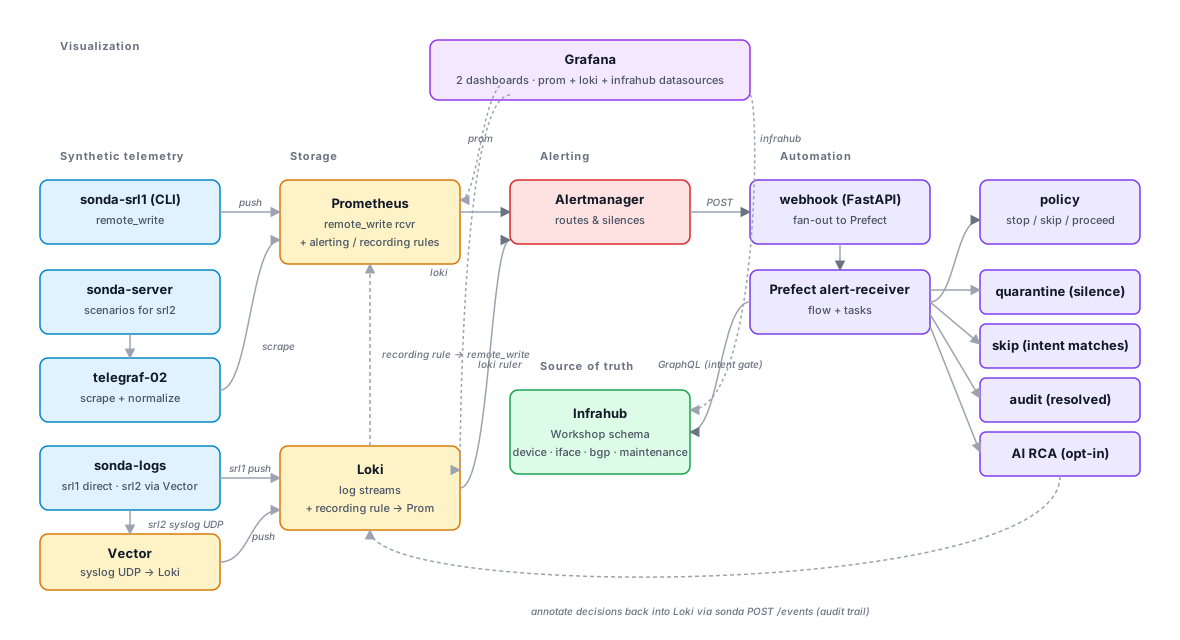
The lab assembles the standard pieces of a modern network observability stack. Here are the building blocks of the stack (this maps to the architecture diagram above), and the tool we picked for each — if any of these are unfamiliar, the Tour the stack page is a one-screen reference per tool:
- Source of Truth (SoT) — Infrahub. The "should be" answers come from here: is this BGP peer expected up, is this device in maintenance, what's the operator intent for this link.
- Telemetry collection — Sonda + Telegraf. Sonda pretends to be the network devices (gNMI-shaped data for
srl1, SNMP-shaped data forsrl2). Telegraf scrapes both shapes and rewrites them into one canonical schema before they hit storage. - Observability storage — Prometheus for metrics, Loki for logs. Both speak query languages that share the same idea: a stream identified by labels, with samples over time.
- Dashboards — Grafana. Prometheus and Loki are the two data sources; every panel you see comes from one of them.
- Alert routing — Alertmanager. Prometheus and Loki rule evaluators say "this is firing"; Alertmanager decides who hears about it and how it's grouped.
- Automation / workflow — Prefect, fronted by a small FastAPI webhook. Alerts that warrant action route through here — the workflow consults Infrahub for intent, decides on quarantine / skip / audit, and (optionally) runs an LLM RCA against the evidence bundle. Every decision is annotated back into Loki for the audit trail.
The raw telemetry Sonda emits is shaped like what a real device puts on the wire: srl1 looks like a Nokia SR Linux box streaming gNMI (srl_bgp_oper_state, source=srl1), srl2 looks like a Cisco/Arista/Juniper box polled over SNMP (bgpPeerState, agent_host=srl2). Both pipelines land in Prometheus normalized to one canonical schema via per-device Telegraf rename rules, so the queries, dashboards, and alerts you build read against that shared shape regardless of which raw vendor protocol fed them. Part 1 walks both shapes end-to-end.
Tour the stack
Six UIs, one URL each. Tour the stack is the single reference for how to reach Sonda server, Prometheus, Alertmanager, Grafana, Prefect, and Infrahub — what to click in each one, and where it shows up across the four parts. Keep it open in a second tab.
The four parts
-
Part 1 — Telemetry and queries
Morning of your first deep day on the on-call rotation. Your senior buddy walks you through the lab's telemetry shape — what "normal" looks like, where the broken things hide, how to bridge a metric anomaly to a log line that explains it.
-
Part 2 — Dashboards and Alerts
Mid-morning — a post-mortem email lands. Last night's page lost ten minutes because a flap-rate panel didn't exist yet. You build it now, with thresholds matching the actual alert rule, while the team is still in the room.
-
Part 3 — Alert response, Automation and AI
Late morning, before lunch — a real alert lands while your senior narrates. Walk the four paths the workflow handles, toggle the AI RCA step, and decide which paths you'd trust the LLM narrative on at 2am.
-
Advanced — End-to-end investigation
The optional capstone. Hours after the senior signs off, your phone rings. Triage with PromQL and LogQL, contain with maintenance, fix the root cause, write the runbook. End-to-end, alone on the rotation.
For instructors and forkers — operator documentation
Maintainers, instructors, and anyone forking this workshop have a parallel set of operator docs in the repo:
docs/— operator documentation index.docs/env-lifecycle.md— who creates.env, who reads it, and the host-vs-container nuance.docs/troubleshooting.md— recurring failure modes and exact recovery commands.docs/repo-layout.md— what every directory contributes and where to look when tracing a flow.docs/data-pipelines.md— the two-pipeline pattern (direct vs shipper) for metrics and logs, with curl commands to inspect raw vs normalized shapes.docs/preflight.md—nobs autocon5 preflightregression check (data-shape waits, per-panel/api/ds/query, headless Grafana screenshots).infrahub/README.md— source-of-truth schema walkthrough.