Capstone · Optional · Solo
The 02:14 page
Hours after the senior signs off, your phone rings. You're alone on the rotation.
The optional capstone. Triage with PromQL and LogQL, contain with maintenance, fix the root cause, write the runbook. End-to-end, no buddy. Pick this up if you finish Parts 1–3 early or want to stress-test what you learned over lunch.
It's 02:14. Your phone just buzzed. By the end of this guide you'll have triaged the page with PromQL and LogQL, watched a real cascade unfold across the dashboards, built a panel that would have caught it sooner, contained the noise with the maintenance flow, simulated the fix, and written the top of your own runbook entry.
This is the workshop's capstone. It assumes Parts 1, 2, and 3 are already behind you — the metric names, the basic PromQL/LogQL patterns, the dashboard layouts, and what nobs autocon5 alerts, flap-interface, and maintenance do are all going to come out under time pressure here. If you haven't walked the three core guides yet, do those first; the pacing here will leave you behind otherwise. Budget 60 to 90 minutes of wall-clock — longer than the part-guides on purpose, because you're integrating everything.
Setup check
Confirm the command is available:
You should see options for --device, --primary-interface, --backup-interface, --duration, and --kind (default link-failover). If incident isn't a recognised subcommand, pull and re-run.
Reset to known-good baseline and confirm the stack is healthy. The investigation puts the lab into states the part guides didn't — so the reset matters more here. Run it before you start:
reset is safe to run repeatedly — it re-loads the Infrahub source-of-truth, clears any device maintenance flags, re-applies sonda's baseline scenarios (so the steady-state broken peers stay firing), and expires any workshop-related Alertmanager silences. status should show every row ok; if anything is yellow or red, flag it before continuing.
Two browser tabs ready:
- Workshop Home at http://localhost:3000/d/workshop-home — situational awareness, alerts table, recent events feed.
- Workshop Lab 2026 at http://localhost:3000/d/dfb5dpyjbh2wwa — the dashboard you'll lean on in Act 4 as the incident unfolds.
Ensure AI RCA analysis is enabled. Open the workshop's .env file at workshops/autocon5/.env and flip these two lines:
Don't forget to reload the workflow after enabling AI RCA:
A scratch text file open on the side. The closing act has you write the top five lines of your own runbook entry, and you'll want somewhere to put them.
The exercises
Act 1 — The page
PAGED 02:14
BgpSessionNotUp on srl1 — peer 10.1.99.2 not reaching Established
last seen Established: ~3 minutes ago
You're awake. The dashboard is your only friend.
Recognise that peer? 10.1.99.2 is the deliberately broken peer you found in Part 1 with the intent-vs-reality query. The alert has been firing in the background of the lab the whole day — it's been there waiting for someone to actually respond to it. Tonight, that's you.
First move from the couch: confirm the page is real and the alert is still firing.
You'll see four alerts firing — the two BgpSessionNotUp rows (one per broken peer) and the two InterfaceAdminUpOperDown rows you met in Part 2. Tonight's page is the srl1 → 10.1.99.2 row in the first group. The other three are the same steady-state noise that's been on the dashboard all day. Stop and notice. This isn't an alert the cascade just manufactured — it's the alert that's been firing since the lab started up, because the lab is set up with a deliberately broken peer wired in. The page is real in lab terms. So: what do you do next?
Act 2 — Triage with PromQL and LogQL
Triage is a decision tree, not a single query. You don't yet know what kind of failure this is. Work through it step by step — each query rules out a class of failure.
Is the device itself unhealthy? Check CPU and memory in the prometheus datasource:
Both should sit in normal range. Conclusion: the device is fine. This isn't a CPU pegging or a memory leak; it's not the box.
Are interfaces flapping? Check the operational state:
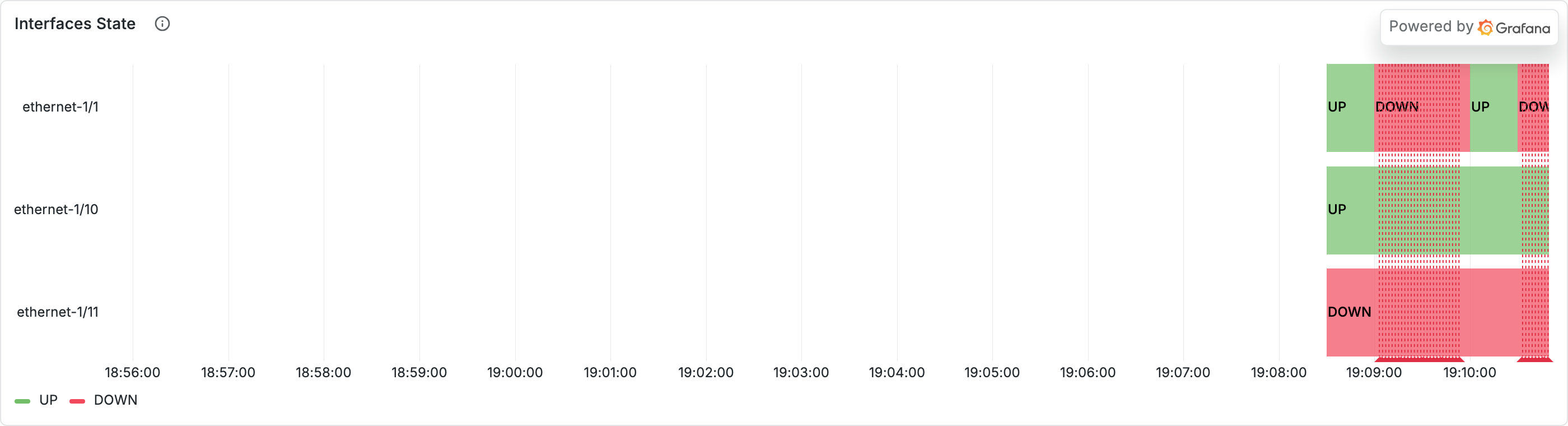
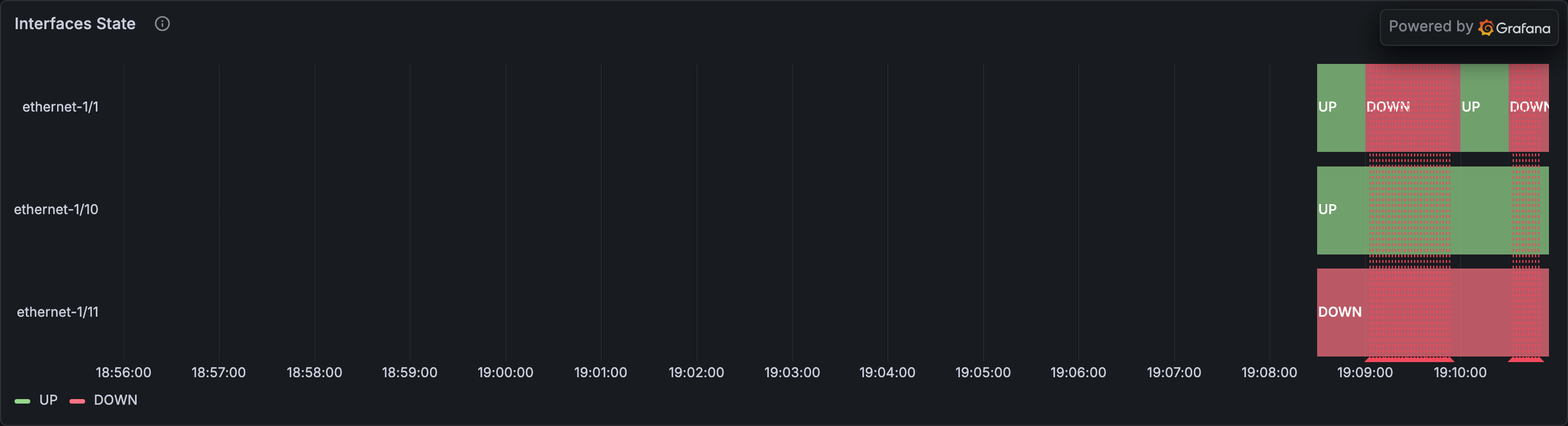
Most interfaces read 1 (UP). You'll see one — ethernet-1/11 — at 2 (DOWN). That's the always-broken interface you met in Part 1; it's why one of the InterfaceAdminUpOperDown alerts is firing. For tonight's page (a BGP session not coming up to a peer), it's a known-quantity background fault, not the symptom. Conclusion: no new interface fault. The lit interfaces are healthy — whatever is going on, it isn't on the wire to the broken peer's network. This is BGP-only.
Is the peer reachable at the BGP layer? Check intent and reality on this specific peer:
Admin reads 1 — the configured intent is "this peer should be up". Oper reads 5 — active, retrying in the gNMI enum convention from Part 1. Reality says "BGP is trying and not succeeding". Conclusion: intent-vs-reality mismatch on this specific peer. This is exactly what the alert is firing on.
Is there a log line that explains why? Bridge to Loki — same labels, different datasource:
You'll see BGP-related lines for that specific peer — fsm transitions, retry attempts, whatever the lab's continuous emitters are producing for the broken session. The metric told you something is wrong. The logs tell you why.
Stop and notice. You narrowed down the problem from a single alert to a specific peer with a specific configured intent that reality isn't matching. This is the triage every on-call walks. The fact that it took four queries instead of one says you're doing it right — count by collapses noise, bgp_oper_state answers the targeted question, the LogQL bridge explains the why. You worked top-down: device, interface, peer, log evidence. Each layer ruled out a class of failure before you went deeper.
Want to see what the automation already thinks about this alert?
The workflow has been running on this alert in the background — it heard the same BgpSessionNotUp page you did, walked its own version of the triage tree, and wrote a narrative to Loki. Read it from the terminal:
Compare it against your own conclusion. Where does the narrative agree with what you found? Where does it surface something you missed — or miss something you caught? A useful frame for the rest of the investigation: automation does the routine work, the human does the judgment. (If the output reads "AI RCA disabled...", the AI step is off — go back and check the setup instructions at the top of this guide. You may also need to wait a moment for the Prefect workflow to complete, then try again.)
Act 3 — Diagnose: drive the cascade and walk the shape
While you were triaging, things escalated. A different problem started developing on the same device — the kind of cascade that starts with a flap and ends with customers complaining about latency. Time to drive it and read it as it unfolds:
The CLI returns immediately and prints three IDs (one per cascade stage). The cascade is now unfolding in the lab — wall-clock timing is in the callout below. Open the Workshop Lab 2026 dashboard — you'll be running three queries against the prometheus datasource in Explore as the incident develops. The Workshop Home dashboard's Recent events feed is also reflecting it; switch tabs occasionally to keep both in view.
The first thing that catches your eye — primary degrading. The interface starts flipping:
Switch to Time series. Within seconds you'll see the line flip between 1 (up) and 0 (down). Roughly 60s up, 30s down. An interface flap is the classic something physical is wrong signal — in a real network this is what makes you walk to the rack. By default the cascade targets ethernet-1/10 as the primary — that's the line that flips. The source="incident-cascade" filter scopes the query to this incident's signals and keeps the lab's baseline interface noise (Parts 1–3's always-broken ethernet-1/11, etc.) off this chart.
Stop and notice. The values are 0 and 1, not the 1/2 gNMI-enum pair you saw in Parts 1–3. This cascade is a different shape of incident — generic up/down rather than the BGP-coupled interface story — so it emits with the simpler 0/1 scheme and the unique source=incident-cascade label. That's also why the existing BgpSessionNotUp alert doesn't trip on this incident: the alert rule matches on bgp_oper_state, and this cascade emits its own three signals, none of them bgp_oper_state. Different incidents, different signal shapes, different alerts. The label is the scoping handle that keeps them separable.
Did failover work?
Empty for the first ~60 seconds — you'll see "no data" or a flat panel. Once the primary drops to 0 for the first time, the metric appears and ramps from around 20% toward 85% over the next two minutes.
Stop and notice. The backup didn't start carrying traffic until the primary actually failed. That's failover working as intended. But notice the direction — utilisation is climbing past where the link is comfortable. This is the early-warning shape an experienced on-call reads as we're going to have a latency problem in a couple of minutes if this doesn't recover. The empty panel for the first minute isn't a query bug — backup-utilisation samples only start landing once the failover is real. Empty panels at the start of an incident are information, not bugs.
The symptom your customers feel — latency:
Empty even longer — latency only starts emitting once the backup has saturated past its baseline, so for the first couple of minutes the panel is silent. Once it lights up, it ramps from ~5ms toward 150ms over three minutes. The chain effect is a feature, not a bug: latency-as-a-symptom typically arrives a few minutes after the root cause is already in motion.
Stop and notice. By the time latency is the visible problem, the actual root cause — the primary uplink fault — happened minutes ago. This is why incident timelines matter. The latency spike is a symptom. The flapping interface was the cause. If your alert fires on latency, your runbook needs to walk back through the cascade to find the real failure. The cascade is the story; the metrics are the chapters. Operators read incidents this way every day.
Why the cascade takes longer than the --duration flag suggests
There's a wall-clock detail worth calling out. The default --duration 3m is the bounded lifetime of each signal in the cascade, not the total lifetime end-to-end. Each phase has to wait for the previous one to escalate before it starts (the flap has to drop, then backup has to saturate past 70%), so the cascade as a whole takes longer than three minutes to fully unfold. Root cause leads symptoms by minutes — that's the lesson, regardless of the wall-clock numbers.
Act 4 — Read the dashboards you already have
The cascade is still unfolding. Latency is climbing, the backup is saturating, the primary is still flapping. The temptation under pressure is to open Grafana's panel editor and start building — don't. Real on-call doesn't build dashboards during a fire; you read what's already there.
"Your dashboards earned their keep this morning, when you built them in peacetime. Tonight, you just read them."
Open Workshop Lab 2026 and walk the panels you already have.
The Flap rate panel you built in Part 2. Set the Device dropdown to srl1, time range Last 15 minutes. You'll see a baseline trickle below the red threshold — and the panel stays quiet, which is itself information. Tonight's incident cascade emits three metrics (interface_oper_state, incident_backup_link_utilization, incident_latency_ms) and no UPDOWN log lines, so a log-derived flap panel has nothing to count. The panel you built is the right panel for a PeerInterfaceFlapping incident; tonight's incident is a different shape.
Interface Operational Status and Interface Traffic. Same dashboard, same $device. The cascade's metrics carry source="incident-cascade" rather than the srl1/srl2 labels the provisioned panels filter on, so to see this incident's exact signals you bounce to Explore with Act 3's three queries. The dashboard panels show the baseline alongside the incident — the lab's steady-state shape during the same window, so you can read deviation against normal noise.
Workshop Home. Switch tabs. The Currently Firing Alerts table still shows the same four steady-state rows from Act 1 — this cascade has its own signals and doesn't trip the existing rules, so the table looks calm. The Recent events feed is reflecting cascade activity as it flows. One tab over keeps you aware without losing the detail view.
The dashboards together tell the cascade's story — flap on Operational Status, pressure rising on Interface Traffic, latency climbing in Explore. The chapters Act 3's queries walked, now visible without typing. Queries are how you discover something is wrong. Dashboards are how you stay aware while you fix it.
Stop and notice. Dashboards earn their keep before incidents, by being there when the page lands. You build during calm; you read during fire. The panel you built in Part 2 didn't move tonight — and that's the right outcome, because tonight wasn't a PeerInterfaceFlapping incident. Tomorrow's might be. The work is done before the page, not after.
Act 5 — Contain: silence the noise with maintenance
The cascade is still running and the dashboards are still on fire. You're going to need quiet to investigate without the automated alert response also firing on every BGP wobble and flap. The on-call's containment move: flag srl1 as in maintenance.
Verify the alert flow's response will now change for this device:
The BgpSessionNotUp row is still in the firing list — that's expected. The alert isn't "fixed" by going into maintenance; what changes is the response path. The webhook flow consults Infrahub on every alert it receives, sees srl1.maintenance=true, and decides skip (reason: device under maintenance) instead of quarantine. Open Workshop Home and look at the Recent events feed: the next time Alertmanager's webhook fires for this alert, the new annotation reads skip rather than quarantine. Alertmanager's repeat_interval for this alert is 30 minutes (covered in Part 3 Phase 1), so you may not see the skip annotation appear within the time you spend in this guide.
Want to see the skip annotation land now?
Drive a fresh cycle directly, bypassing Alertmanager's repeat_interval:
Within ~15 seconds the four-panel cycle view re-renders with the fresh decision=skip audit record. For the AI narrative side of the same evidence:
Either surface shows the decision=skip / reason=device under maintenance record the workflow just wrote.
Stop and notice. Maintenance isn't a static config attribute on the device — it's a containment lever the on-call engineer uses live during an incident. Setting the flag signals to the automation: "someone is actively working here; hold off on automated actions." The flow consults the source of truth at decision time, so the change takes effect on the very next alert that arrives. This is the source-of-truth integration paying off.
Act 6 — Fix and recover
Time to simulate the fix landing. Stop the cascade mid-flight — nobs autocon5 reset is the standard way to clear in-flight cascade scenarios:
Reset is safe to run repeatedly — it re-loads Infrahub, clears any device maintenance flags, re-applies sonda's baseline scenarios, deletes any cascade scenarios still running, and expires any workshop-related Alertmanager silences. Watch the dashboards. Within ~30 seconds the cascade signals stop changing, the lab's continuous emitters take over, the panels drift back toward green. Latency drops on incident_latency_ms. incident_backup_link_utilization flatlines.
Note that reset already cleared the maintenance flag for srl1 as part of returning the lab to known-good state. Re-run nobs autocon5 alerts: the original BgpSessionNotUp is still firing — the deliberately broken peer hasn't been "fixed" because that's a configuration issue baked into the lab, not what we just simulated. But the response path is back to default: the next alert routing through the flow will get the full policy treatment again.
Stop and notice. The dashboard goes green. Latency drops. The metrics tell the recovery story the same way they told the failure story — in causal order, with timing that matches what an operator's intuition would expect. Real fixes don't always look this clean — the lab's synthetic data lets us show recovery as a proper signal so you see the full arc, not just the degradation half.
Act 7 — Write the runbook stub
Last act. You've just walked an incident end-to-end. The most valuable thing you can do with that fresh memory is write down what would help the next on-call. Open your scratch file and finish this template in your own words:
## Runbook — primary uplink degradation cascade

**Symptom on the page:** _________________

**First three queries to run:**
1. _________________
2. _________________
3. _________________

**Containment action:** _________________

**What "fixed" looks like in the dashboard:** _________________
Fill the blanks based on what you actually walked through. Don't reach for textbook answers — what did you check first? What query gave you the most signal per second? What did you do to stop the bleeding so you could think?
Then re-read what you wrote.
If a colleague got paged at 2am with this same symptom and you weren't around, would your five lines get them through it?
Stop and notice. Runbooks are the artefact every observability investment is ultimately for. Telemetry shapes you can query, dashboards you can read, alerts that fire at the right time — they all funnel into the runbook entries that make the next on-call's job survivable. You just walked through the shape; you wrote the entry. That's the loop.
Stretch goals (optional — pick one if you have time)
-
Drive the same investigation on srl2. The cascade you just walked was on srl1. Re-run it on srl2 and confirm your runbook stub still applies — if it doesn't, it was either too device-specific or you've found a real shape difference worth writing down.
Solution — command to run + what to expect on srl2
Run
nobs autocon5 incident --device srl2. It produces the same cascade shape on srl2. The pre-existingBgpSessionNotUpalert forsrl2 → 10.1.11.1(the deliberately-broken peer on the SNMP-shape device) was visible in Act 1 already.Act 2's triage queries all work the same way — just change the device label and adjust the peer:
You'll see the same shape:
oper_state=5(stuck in active) on a peer whose SoT saysexpected_state=established. The triage decision tree doesn't care about the device label — it's the same intent-vs-reality pattern.If your runbook stub didn't apply when you swapped to srl2, it was either too device-specific ("check srl1's config") or accidentally encoded a vendor-shape assumption that doesn't survive the SNMP path.
-
Predict the customer-impact window. At what point in the cascade would a customer's response-time SLO break? Back the answer with data from Act 3's queries, not feel.
Solution — the math + customer-impact arithmetic
Given the timing you observed (backup utilisation crossing 70% around t=2½ min, latency ramping from there toward 150ms over the next three minutes), linear interpolation on latency:
- At t ≈ 2:30, latency starts at 5 ms.
- At t ≈ 5:30, latency hits 150 ms (3 min of ramp).
latency ≈ 5 + (t − 2:30) × (150 − 5) / 3ms.
A typical web-service SLO target is p99 < 200 ms total, with maybe 30–50 ms of that budget allowed for backend round-trips. So latency above ~50 ms consumes the SLO budget; above ~100 ms breaks it.
- 50 ms reached at t ≈ 3:25 (start eating SLO budget — about 55 seconds after the primary's first DOWN edge).
- 100 ms reached at t ≈ 4:30 (SLO breach — about 2 minutes after the primary's first DOWN edge).
The lesson: by the time customers complain (p99 broken), the primary uplink fault is already 3–4 minutes old. The alert needs to fire on a root-cause signal (the flap, or backup utilisation crossing threshold), not on the latency symptom — otherwise you're permanently 3 minutes behind the customer impact.
-
Compare the investigation arc to the automated path. Contrast the manual investigation you just walked against Part 3's automated flow. Where does each one belong in a real operation?
Solution — command to run + the qualitative comparison
Run
nobs autocon5 try-itfrom Part 3 — it walks the four alert paths automatically.try-itis the automation handling routine cases without you; the investigation game you just walked is what you do when automation isn't enough — when you need to know what the workflow would have done, why, and whether to override it.Two different jobs, both useful:
Aspect Investigation (Acts 1–6) Automation ( try-it)When you do it Reactive, post-page, under pressure Pre-computed, in calm Latency Minutes per query, hours for the full arc Seconds end-to-end What it produces A runbook entry, a hypothesis, a fix A categorised decision + an audit annotation Where it excels When you have time and a specific question When alert volume exceeds human attention Where it falls short At 2am with 50 alerts firing simultaneously When the situation is novel — outside the policy's rule set The lesson: automation handles routine cases (broken peer, BGP mismatch, device in maintenance — one second per alert). Investigation handles the unusual cases — where you need to question the policy's reasoning, decide whether to override, or change the policy itself.
In production, both run in parallel: the flow handles 95% of alerts on autopilot, and the on-call engineer steps in only for the 5% the policy escalates or can't confidently classify.
What you took away
- The shape of an interface-degradation incident — primary fault → failover → backup pressure → latency — is universal. Latency is almost always a symptom; walk back through the cascade to find the cause.
- Same labels on metrics and logs means correlation is one query change away. Metric tells you what; log tells you why. The metric-to-log bridge is the single most useful pattern under pressure.
- Dashboards are built in peacetime and read in crisis; runbooks are the durable artefact every observability investment funnels into. Five good lines, written while the memory is fresh, are worth more than a polished page nobody can find at 02:14.